




Back to my earlier post, and have you considered a guide and the move tool ?
(1) In the view menu there is Snap to Guides (which is usually the default) and a Gimp 3 addition Snap to Equidistance which you can toggle on. Moving the first layer, snaps to the guide.
(2) Moving the next layer, snaps to the guide and sets an offset from the first layer.
(3) Moving subsequent layers, snaps to guide and snaps to the offset between layers.
(4) Once all aligned, you can of course move as selected layers.
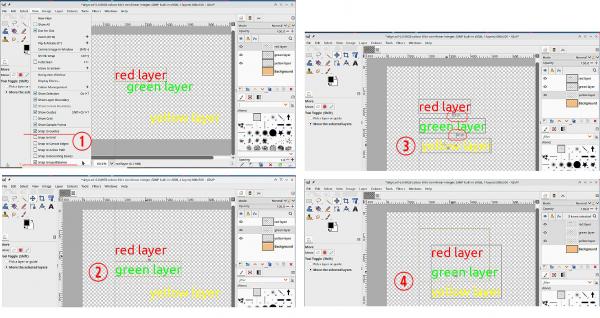
(1) In the view menu there is Snap to Guides (which is usually the default) and a Gimp 3 addition Snap to Equidistance which you can toggle on. Moving the first layer, snaps to the guide.
(2) Moving the next layer, snaps to the guide and sets an offset from the first layer.
(3) Moving subsequent layers, snaps to guide and snaps to the offset between layers.
(4) Once all aligned, you can of course move as selected layers.