




good evening dear GarzaW - hello dear Rich2005 
first of all many many thanks for the great reply and for your input:
Rich you mentioned:
There are a few ways for this. One way to try is:
Well - thats just overweleming - i am so glad.
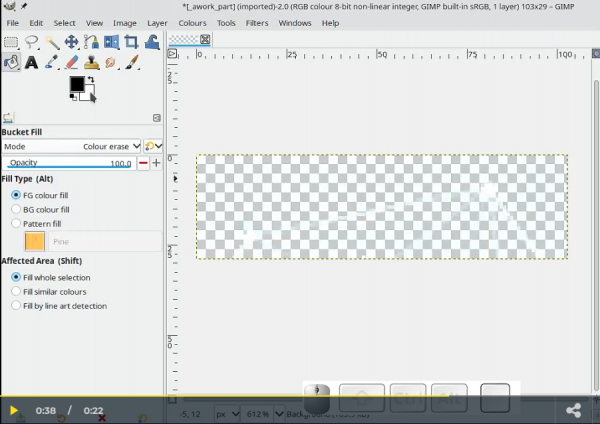
I have tried to work according your mini-tutorial: But believe me or not: i did not manage to get exacly to this "Screen"
i have seen the clip at least 20 times - but i did not get it - how your steps looked exactly to achieve this screen - where we have nothing lieft than the
line of the "Network" -
hmm - probably my difficulties have to to with my "mother-tounge" English is not my native language..
Well - what were the steps to achieve the screen shown above.
Now i am going to have a closer look at the clip - which is generally a true masterpiece.
greetings
update: aaargh - after watching the clip the 22 th time i think i have seen a small but pretty important detail: the "mode" was set to "color-erase"
guess - that this is the important step...
i will try it out.. 
first of all many many thanks for the great reply and for your input:
Rich you mentioned:
There are a few ways for this. One way to try is:
Quote:(1) Colors -> Auto -> White Balance ( the connecting lines are very faint and probably will not show on a light background)[url=https://sendvid.com/msgycwvm][/url]
(2) Bucket Fill using Affected Area = Fill whole selection Fill Type = FG color Mode = Color erase.
(3) Set the Background (BG) color as required.
(4) Image -> Flatten Image (this replaces any transparency with the BG color)
A 30 second animation of that: https://sendvid.com/msgycwvm
Well - thats just overweleming - i am so glad.
I have tried to work according your mini-tutorial: But believe me or not: i did not manage to get exacly to this "Screen"
i have seen the clip at least 20 times - but i did not get it - how your steps looked exactly to achieve this screen - where we have nothing lieft than the
line of the "Network" -
hmm - probably my difficulties have to to with my "mother-tounge" English is not my native language..
Well - what were the steps to achieve the screen shown above.
Now i am going to have a closer look at the clip - which is generally a true masterpiece.
greetings
update: aaargh - after watching the clip the 22 th time i think i have seen a small but pretty important detail: the "mode" was set to "color-erase"
guess - that this is the important step...
i will try it out..