(02-14-2026, 07:49 PM)NoUserName Wrote: I can not open raw files on gimp anymore, can anyone help me with this? I did install darktable but i do not have any idea how i can use it to make raw's open on gimp
(link to picture from the message i get)
https://imgur.com/a/Rvgsuxu
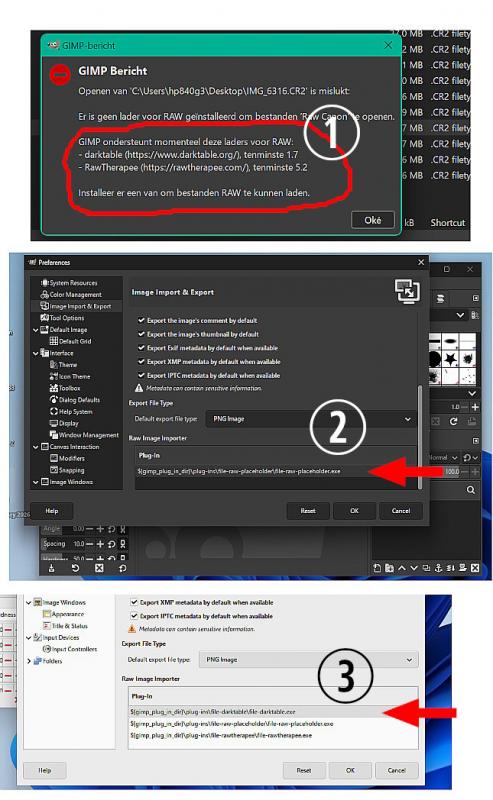
The error message (1) means that Gimp does not find the Darktable installation.
Either an incorrect installation or using incompatible version of Gimp and Darktable (..an old version of Darktable ?)
Look in Edit -> Preferences -> Import & Export (2) and without a Darktable there is only the placeholder.exe reference.
With Darktable installed there is a Darktable entry (3)
You do need to select that. I changed the theme to make it easier to see. There is also Rawtherapee installed and to use that select the rawtherapee.exe entry.
 Using Win11 / Gimp 3.0.8-2 / Darktable 5.4.1
As far as I can see this does not work. The image is sent from Gimp to Darktable. Closing Darktable to send back to Gimp and there is an "unable to open message"
You can still use Darktable if you want. Open the image in Darktable, do any editing and export to file as a high bit tif or .xcf. Open that in Gimp. Personally, I think the Darktable interface is appalling. (all in the eye of the developer)
Using Win11 / Gimp 3.0.8-2 / Rawtherapee 5.12
Selecting rawtherapee in Edit -> Preferences and Gimp 3 sends the selected .cr2 image to Rawtherapee. Close and the image is sent back to Gimp as expected.
Edit: from an earlier post with a similar issue: This bug report
https://github.com/darktable-org/darktable/issues/19988
Depending on Darktable version used, try an earlier version: version 5.2.1







