

Thread Rating:
  • 0 Vote(s) - 0 Average
  • 1
  • 2
  • 3
  • 4
  • 5
Cannot open camera raw images
#1
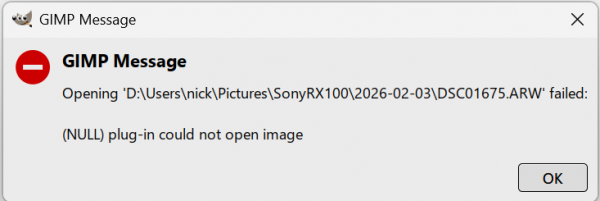
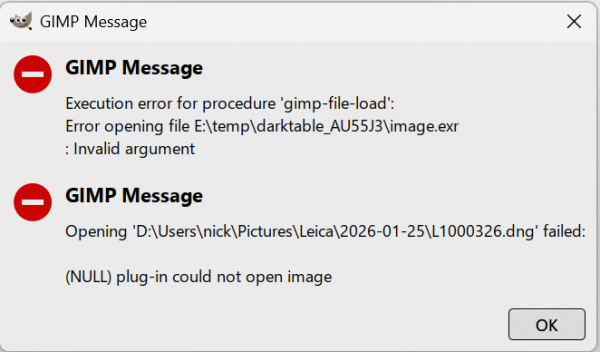
This is with Gimp 3.0.8-2 and Darktable 5.4.1 on Windows 11. When I try to open an ARW raw from my Sony camera or a DNG raw from my Leica, Gimp starts Darktable and the images display in Darktable as I would expect. When I close Darktable it displays "Exporting to GIMP" on the screen, but I then just get an error dialog, and the image doesn't appear in Gimp. 

For ARW files, the error dialog is this:
   

For DNG files, the error dialog is this:
   

When I look at Gimp's preferences for Image import and export, the import options are set to this:

   

Any suggestions on a fix?
Reply
#2
DT 5.4.1 is listed as latest and Gimp 2.0.8-2 is only a couple of days old. Both arw and dng images failed ?

There is a reasonably recent similar post here: https://discuss.pixls.us/t/darktable-5-2...port/54511

You could ask the question on pixls.us where a DT maintainer posts.

If I had that issue, I would start by installing say, RawTherrapee. If that works then Gimp is basically ok (but the DT plugin is defunct) Still the same then maybe try the Gimp 3.2 development version or roll back to earlier Gimp / DT versions.
Reply
#3
I have Darktable 5.4.0 GIMP 3.0.8-2
identical situation for any RAW file
GIMP 3.2.0-RC2 - same thing !!!
Reply
#4
Yes, both ARW and DNG images failed to open. I uninstalled Darktable and installed RawTherapee, and I can now open the raw images in Gimp OK by using RawTherapee as the interface into Gimp.
Reply
#5
(02-11-2026, 07:37 AM)NickJP Wrote: Yes, both ARW and DNG images failed to open. I uninstalled Darktable and installed RawTherapee, and I can now open the raw images in Gimp OK by using RawTherapee as the interface into Gimp.

https://github.com/darktable-org/darktable/issues/19988
Reply
#6
(02-11-2026, 01:09 PM)Zbyma72age Wrote:
(02-11-2026, 07:37 AM)NickJP Wrote: Yes, both ARW and DNG images failed to open. I uninstalled Darktable and installed RawTherapee, and I can now open the raw images in Gimp OK by using RawTherapee as the interface into Gimp.

https://github.com/darktable-org/darktable/issues/19988

But, "if not with a stick then with a club".
Until they solve the problem =>
Why not develop your photos directly in darktable, and then invoke GIMP via Lua if really needed?
Darktable has so powerful editing capabilities that I have not used GIMP to edit photos for years.
https://docs.darktable.org/usermanual/4.2/en/lua/
https://github.com/darktable-org/lua-scr...b/gimp.lua
Works very well in GIMP 3.2 RC2 as well as in GIMP 2.10.38


Attached Files Image(s)
   
Reply


Forum Jump: