




good day dearGIMP-Fans, 
first of all - many thanks for your great forum. i am glad to be here - to be a part of your great forum.
today i have a workflow question: i am interested in the extracting a "Dotted Network" skeleton from a glowing raster image for vector editing
the goal: I have a complex raster image (a network of dots/lines on a dark background). I want to "isolate a layer" to get a rough, clean vector skeleton (Base Layer). Later, I will use this skeleton as a foundation to build upon (a Model Layer).
my base question 1:the right tool Selection
Which is the best primary tool for this specific "extraction" step?
a) GIMP: (For curves/threshold) - i guess that this is the tool to use
b) Inkscape: (For bitmap tracing)
c) Krita: hmmm (For color-to-alpha)
My assumption is to use GIMP to kill the background and Inkscape to trace the dots to vectors. Is there a way to do this purely in one software?
the question here: Isolation Technique
How do I isolate only the brightest: lines/dots (..without dragging the "bokeh" (blurry glow) along with them?).....
- Is it better to work with Layers (e.g., subtracting a blurred layer)?
- Or is Color Decompose (HSV - Value channel) the standard approach?
- Are there specific filters (like "Edge Detect" or "Threshold") that preserve the dot structure without making them blobs?
the Question 3: The Vectorization:
When using Inkscape's Trace Bitmap, how do I prevent the scattered dots from merging together? The original image has distinct nodes, but the glow connects them. How do I tell the software to separate the "nodes" from the "edges"?
I want to keep this technology-neutral to learn all possible approaches, but I am guess that it best would be gained if i go with GIMP
to get the workflows done.
look forward to hear from you
Thanks!
saint_m
-additional: some little & tiny ASCII Graphics that illustrates the "layer--stacking" . the"Layer Stacking" concept.
the Figure 1: The Base Extraction
my goal here: i wanna remove the background glow, and keep the structure.
Figure 2: The Model Layer (Your desired workspace)
the Goal: Lock the base, draw freely on top.
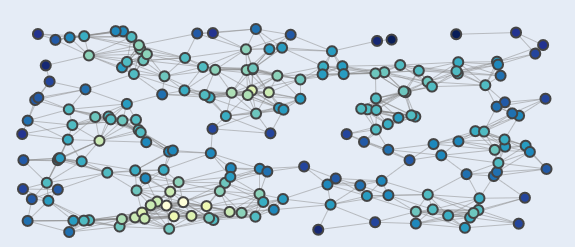
Again: what i want is - the main goal: the Extracting of a "Dotted Network" skeleton from a example image: " glowExtracting" a "Dotted Network" skeleton from a glowing raster image for vector editinging raster image for vector editing
look forward to hear from you
greetings
ps - see a example -in this illustration we see many dods - the question - how can we isolate some of them ..!?
first of all - many thanks for your great forum. i am glad to be here - to be a part of your great forum.
today i have a workflow question: i am interested in the extracting a "Dotted Network" skeleton from a glowing raster image for vector editing
the goal: I have a complex raster image (a network of dots/lines on a dark background). I want to "isolate a layer" to get a rough, clean vector skeleton (Base Layer). Later, I will use this skeleton as a foundation to build upon (a Model Layer).
my base question 1:the right tool Selection
Which is the best primary tool for this specific "extraction" step?
a) GIMP: (For curves/threshold) - i guess that this is the tool to use
b) Inkscape: (For bitmap tracing)
c) Krita: hmmm (For color-to-alpha)
My assumption is to use GIMP to kill the background and Inkscape to trace the dots to vectors. Is there a way to do this purely in one software?
the question here: Isolation Technique
How do I isolate only the brightest: lines/dots (..without dragging the "bokeh" (blurry glow) along with them?).....
- Is it better to work with Layers (e.g., subtracting a blurred layer)?
- Or is Color Decompose (HSV - Value channel) the standard approach?
- Are there specific filters (like "Edge Detect" or "Threshold") that preserve the dot structure without making them blobs?
the Question 3: The Vectorization:
When using Inkscape's Trace Bitmap, how do I prevent the scattered dots from merging together? The original image has distinct nodes, but the glow connects them. How do I tell the software to separate the "nodes" from the "edges"?
I want to keep this technology-neutral to learn all possible approaches, but I am guess that it best would be gained if i go with GIMP
to get the workflows done.
look forward to hear from you
Thanks!
saint_m
-additional: some little & tiny ASCII Graphics that illustrates the "layer--stacking" . the"Layer Stacking" concept.
the Figure 1: The Base Extraction
my goal here: i wanna remove the background glow, and keep the structure.
Quote:Code:
    [Original Image: Glowing Dots + Dark BG]

                  |

                  v (Threshold & Decompose)

    +---------------------------------------+

    |  EXTRACTED BASE LAYER                 |

    |   .-----o      .-----o                |

    |   |      \    /         |             |

    |   o       o--o       o                |

    |  / \     /    \       / \             |

    | o   o---o      o---o                  |

    |                                 (White lines, Transparent BG) |

    +---------------------------------------+
Figure 2: The Model Layer (Your desired workspace)
the Goal: Lock the base, draw freely on top.
Code:
    +---------------------------------------+

    |  MY_NETWORK (Drawing Layer)           |

    |  (Here I add my new colors/shapes)    |

    +---------------------------------------+

    |  BASE (Reference Layer)               |

    |   .-----o      .-----o                |

    |   |      \    /         |             |

    |   o       o--o       o                |

    +---------------------------------------+

         (Locked, semi-transparent)
Again: what i want is - the main goal: the Extracting of a "Dotted Network" skeleton from a example image: " glowExtracting" a "Dotted Network" skeleton from a glowing raster image for vector editinging raster image for vector editing
look forward to hear from you
greetings
ps - see a example -in this illustration we see many dods - the question - how can we isolate some of them ..!?

