Posts: 3
Threads: 1
Joined: Nov 2025
Reputation:
0
Gimp version:
Operating system(s): OSX/MacOS
Hi! Sorry for my English. I have a problem: OSX Ventura x86, GIMP 2.10 or 3, same problem. When loading, the GIMP splash screen gets stuck for about 1 minute, and then it loads successfully.
However, if I disable Wi-Fi before starting GIMP, it starts almost instantly. The same happens if GIMP is stuck on the splash screen and I disable Wi-Fi — it immediately continues loading.
I tried blocking GIMP with the firewall and with LuLu, but nothing changed.
For now, I made an Automator script that disconnects the network, opens GIMP, and reconnects it afterward, but I’m looking for a proper solution. Sometimes I’m downloading a file, forget to disable Wi-Fi, open GIMP, and my download gets interrupted.
Thanks a lot for any help!
Posts: 7,990
Threads: 171
Joined: Oct 2016
Reputation:
1,092
Gimp version:
Operating system(s): Linux
11-15-2025, 08:52 AM
(This post was last modified: 11-15-2025, 08:53 AM by rich2005.)
Have you tried turning "Check for Updates" in Edit -> Preferences -> System Resources -> Network Access: OFF
It might / might not be the problem

Posts: 6,955
Threads: 297
Joined: Oct 2016
Reputation:
605
Gimp version:
Operating system(s): Linux
(11-15-2025, 12:10 AM)theelf Wrote: Hi! Sorry for my English. I have a problem: OSX Ventura x86, GIMP 2.10 or 3, same problem. When loading, the GIMP splash screen gets stuck for about 1 minute, and then it loads successfully.
However, if I disable Wi-Fi before starting GIMP, it starts almost instantly. The same happens if GIMP is stuck on the splash screen and I disable Wi-Fi — it immediately continues loading.
I tried blocking GIMP with the firewall and with LuLu, but nothing changed.
For now, I made an Automator script that disconnects the network, opens GIMP, and reconnects it afterward, but I’m looking for a proper solution. Sometimes I’m downloading a file, forget to disable Wi-Fi, open GIMP, and my download gets interrupted.
Thanks a lot for any help!
A possibility is that you have a lingering network drive, and yoru Gimp is configured to use it (see Edit > Preferences > Folders, and unfold to check each type).
Posts: 3
Threads: 1
Joined: Nov 2025
Reputation:
0
Gimp version:
Operating system(s): OSX/MacOS
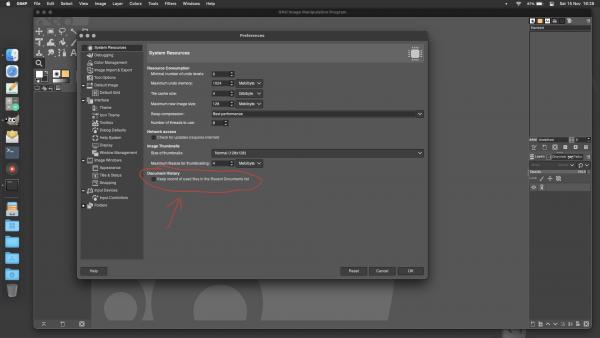
thank guys for help, finally i discover the problem
Was document history! but i dont have any network drive, or icloud or something like this, nothing. In fact i even dont have apple account
Posts: 6,955
Threads: 297
Joined: Oct 2016
Reputation:
605
Gimp version:
Operating system(s): Linux
(11-15-2025, 03:53 PM)theelf Wrote: thank guys for help, finally i discover the problem
Was document history! but i dont have any network drive, or icloud or something like this, nothing. In fact i even dont have apple account
If this was the problem, better enable it (it has its usefulness) but go to Windows > Dockable dialogs > Document history, click the < icon on top right and hit Documents menu > Remove dangling entries.
Posts: 3
Threads: 1
Joined: Nov 2025
Reputation:
0
Gimp version:
Operating system(s): OSX/MacOS
(11-15-2025, 04:06 PM)Ofnuts Wrote: (11-15-2025, 03:53 PM)theelf Wrote: thank guys for help, finally i discover the problem
Was document history! but i dont have any network drive, or icloud or something like this, nothing. In fact i even dont have apple account
If this was the problem, better enable it (it has its usefulness) but go to Windows > Dockable dialogs > Document history, click the < icon on top right and hit Documents menu > Remove dangling entries.
Thanks a lot for your help, YES, this is MUCH better, now i don't lost history, and no problem in loading, less than 4 seconds
this option was impossible to guess without advice, too hidden! thanks
|





