




Interesting  I can reproduce that truncated exported png. I do not know why, guessing it is the way Gimp 3 imports a PS layered file but that top layer group Mask (turn off) contains layers with no visibility property. Go down it and enable & turn off the layer visibility.
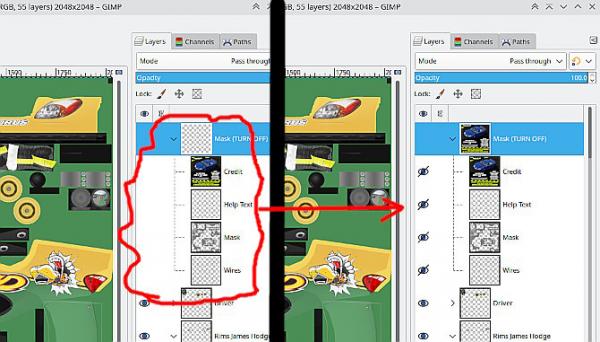
That works here, exporting as a png gives the full image.
Still not working for you ? Then resort to the old trick. Go to the top of the stack, Layer -> New from Visible. Drag that "visible" layer into the tool box and it opens as a single layer for export.
I did look at opening in Gimp 2.10.38 and your .xcf file is type 23 (Gimp 3) I can edit that with a binary editor to type 13 ( gimp 2.10) and that works as far as exporting. Must be a Gimp 3 thing.
I can reproduce that truncated exported png. I do not know why, guessing it is the way Gimp 3 imports a PS layered file but that top layer group Mask (turn off) contains layers with no visibility property. Go down it and enable & turn off the layer visibility.That works here, exporting as a png gives the full image.
Still not working for you ? Then resort to the old trick. Go to the top of the stack, Layer -> New from Visible. Drag that "visible" layer into the tool box and it opens as a single layer for export.
I did look at opening in Gimp 2.10.38 and your .xcf file is type 23 (Gimp 3) I can edit that with a binary editor to type 13 ( gimp 2.10) and that works as far as exporting. Must be a Gimp 3 thing.