




01-19-2026, 08:41 AM
(This post was last modified: 01-19-2026, 09:00 AM by rich2005.
Edit Reason: edit
)
A regular Gimp linux profile is ~/.config/GIMP/3.0/ (~ is linux for your home folder) Since you are using a SNAP look for something like ~/snap/gimp/380/.config/GIMP/3.0/ I do not use anything SNAP so not sure how it works these days. EDIT: Any version Gimp. The gimp user profile remains between installs. All your settings are held there which is why reinstalling rarely changes anything.
That screenshot you posted just defines how an image is displayed, dot-for-dot = one image pixel per display pixel Turn that off and the image displays as the real world size. For editing keep it on.
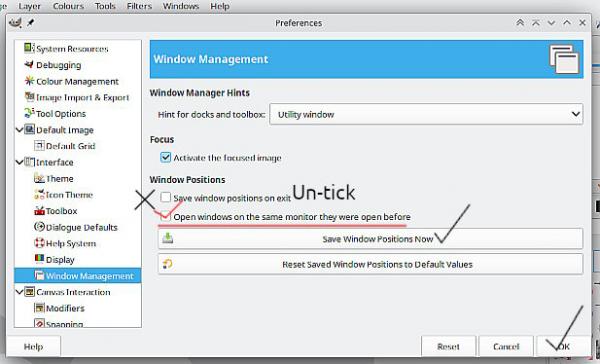
I am assuming that your Cintiq 12WX is effectively a second monitor and you probably have already done this in Edit -> Preferences.
Just a note on Gimp installation options: For kubuntu 24.04 there is a regular installation from a PPA
see: https://launchpad.net/~ubuntuhandbook1/+...ntu/gimp-3 Got to be better than a SNAP
That screenshot you posted just defines how an image is displayed, dot-for-dot = one image pixel per display pixel Turn that off and the image displays as the real world size. For editing keep it on.
I am assuming that your Cintiq 12WX is effectively a second monitor and you probably have already done this in Edit -> Preferences.
Just a note on Gimp installation options: For kubuntu 24.04 there is a regular installation from a PPA
see: https://launchpad.net/~ubuntuhandbook1/+...ntu/gimp-3 Got to be better than a SNAP