Posts: 2
Threads: 0
Joined: Jul 2025
Reputation:
0
Gimp version:
Operating system(s): Linux
07-26-2025, 02:31 PM
(This post was last modified: 07-26-2025, 03:15 PM by Andrew_P.
Edit Reason: inadvertently quoted previous post
)
(07-26-2025, 11:52 AM)rich2005 Wrote: I said I would try a Mint 22.1 VM, new installation & updated. No Gimp installed
xsane 0.999 from the repo works and using my ancient Canon LiDE 30 (usb) scanner looks like this:
Note that Gimp 2 is a dependency (Gimp 2.10.36 is the default for 'buntu 24.04 / Mint 22 )
....the question is where did the Gimp 3.0.4 come from ?
GIMP 3.0.4 was pushed as an update by Linux Mint, overwriting the default GIMP 2.10.36 that I installed when I set the system up from scratch in November 2024.
Posts: 8,039
Threads: 172
Joined: Oct 2016
Reputation:
1,097
Gimp version:
Operating system(s): Linux
(07-26-2025, 02:31 PM)Andrew_P Wrote: GIMP 3.0.4 was pushed as an update by Linux Mint, overwriting the default GIMP 2.10.36 that I installed when I set the system up from scratch in November 2024.
The only problem there is, Gimp 3.0.4 is not standard in Mint 22.1 Gimp either came from a PPA or flatpak (or maybe an appimage). Even with Mint 22.1 Gimp comes fron ubuntu 24.04 and is 2.10.36
Packing in for a break but much trying out to see what works / does not work and not much works.
The default xsane 0.999 works stand-alone
For Gimp 2.10.36 the plugin that xsane 0.999 installs does not work - not a surprise , been broken a long time.
Using a PPA for Gimp 3.0.4 there are two that I know of
https://launchpad.net/~ubuntuhandbook1/+...ntu/gimp-3
https://launchpad.net/~mati75/+archive/ubuntu/gimp30
I had problems with GEGL - version too old, but I will go back sometime and try again. Using a Gimp 3.0.4 appimage There is a problem with the plugin - looks like a python incompatibility.
As a non- Mint check using kubuntu 25.04 , comes with Gimp 3.0.2 as default, xsane 0.999 and the xsanecli plugin works.
A real can of worms. At least with Mint 22.1 you can still scan & save to an image for editing with (whichever) Gimp installed.
Posts: 8,039
Threads: 172
Joined: Oct 2016
Reputation:
1,097
Gimp version:
Operating system(s): Linux
07-26-2025, 06:53 PM
(This post was last modified: 07-26-2025, 06:54 PM by rich2005.)
@Andrew_P
This mix works: Mint 22.1 / Gimp 3.0.4 from https://launchpad.net/~mati75/+archive/ubuntu/gimp30 / xsane 0.999 from repo.
proof  about a minute: https://i.imgur.com/j4tPUbw.mp4
Posts: 1
Threads: 0
Joined: Nov 2025
Reputation:
0
Gimp version:
Operating system(s): Linux
(01-12-2025, 06:14 AM)snovotill Wrote: I am now able to use my scanner in Gimp 3 thanks to the developer who published it at https://yingtongli.me/git/gimp-xsanecli
It works in Wayland as well as X.
Thanks for the tip. Unfortunately it does not work for me :
ModuleNotFoundError: No module named 'gi'
what should I do to install this lib ?
and an aside (and acid) remark : why is it so difficult to add a scan menu to GIMP on Ubuntu ???
Posts: 6,955
Threads: 297
Joined: Oct 2016
Reputation:
605
Gimp version:
Operating system(s): Linux
That should have worked. gi is the general support for Glib introspection. Comes with python3-gi among other things. Pretty much part of a standard install AFAIK. What version of Ubuntu are you on? And what version of Gimp are you using with what packaging (snap/deb/flatpak/other)?
Posts: 1
Threads: 0
Joined: Jan 2026
Reputation:
0
Gimp version:
Operating system(s): Linux
Using Ubuntu 24.04 / Gimp 3.0.6 and xscane 0.999
I see "XSane via CLI..." in the GIMP menu.
When I click on it nothing happings.
I get the following message:
(gimp:23916): GLib-GIO-WARNING **: 22:25:57.756: Error creating IO channel for /proc/self/mountinfo: Permission denied (g-file-error-quark, 2)
Traceback (most recent call last):
File "/home/jan/snap/gimp/542/.config/GIMP/3.0/plug-ins/xsanecli/xsanecli.py", line 53, in xsanecli_run
proc = subprocess.Popen(args, stdout=subprocess.PIPE, encoding='utf-8', env=xsane_env)
^^^^^^^^^^^^^^^^^^^^^^^^^^^^^^^^^^^^^^^^^^^^^^^^^^^^^^^^^^^^^^^^^^^^^^^^^^^^^^^
File "/snap/gimp/542/gnome-platform/usr/lib/python3.12/subprocess.py", line 1026, in __init__
self._execute_child(args, executable, preexec_fn, close_fds,
File "/snap/gimp/542/gnome-platform/usr/lib/python3.12/subprocess.py", line 1955, in _execute_child
raise child_exception_type(errno_num, err_msg, err_filename)
FileNotFoundError: [Errno 2] No such file or directory: '/usr/bin/xsane'
When I start xsane directly in Python, everything works fine.
Does anyone have any idea how I can set the mount permission correctly?
#!/usr/bin/env python3
import os, subprocess, tempfile
tempDir = tempfile.mkdtemp('gimp-plugin-xsanecli')
png_out = tempDir+os.sep+'out.png'
args = ['xsane', '--save', '--no-mode-selection', '--force-filename', png_out, '--print-filenames']
proc = subprocess.Popen(args, stdout=subprocess.PIPE, encoding='utf-8', env=dict(os.environb))
if os.path.isfile(png_out): os.remove(png_out)
if os.path.isdir(tempDir): os.rmdir(tempDir)
Posts: 1
Threads: 0
Joined: Feb 2026
Reputation:
0
Gimp version:
Operating system(s): Linux
Plug-in is working correctly in GIMP 3.0 on Debian Trixie, but due to a recent update, XSane's preview window bugs out. Reading up on this, the workaround is to issue the --sync option when calling xsane. To get this to work with the plug-in, I had to add this argument to the args in line 52 of the Python code.
args = ['xsane', '--save', '--no-mode-selection', '--force-filename', png_out, '--print-filenames', '--sync'] ...
Posts: 3
Threads: 0
Joined: Mar 2026
Reputation:
0
Gimp version:
Operating system(s): Linux
Installed the xsanecli plugin in Gimp 3.2rc2 . The Xscane does work. However, after I scan a page.The captured page is not returned
Posts: 8,039
Threads: 172
Joined: Oct 2016
Reputation:
1,097
Gimp version:
Operating system(s): Linux
(03-16-2026, 04:15 PM)beiruty Wrote: Installed the xsanecli plugin in Gimp 3.2rc2 . The Xscane does work. However, after I scan a page.The captured page is not returned
Does that mean that using Gimp File -> Create -> Xsane via CLI XSANE open and scans but the image does not open in Gimp (that is the way it reads to me) This in a Mint 22.3 / Gimp 3.2 (from PPA) and you can see it works here.
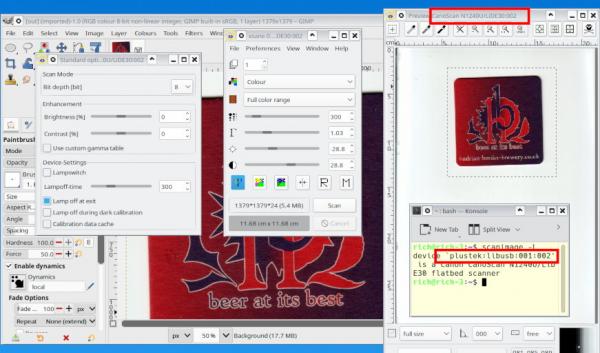
You do have to be careful with the device name, might not be the same as XSANE shows. Check in a terminal using scanimage -L
In the plugin, line 30 your scanner name goes as DEVICE_NAME = "plustek:libusb:001:002"
Maybe some more details and see if anyone comes up with an answer.
Which linux distro?
Which Gimp package, Flatpak , Snap , Appimage or from the disto repository.
When did you download the plugin package ? I see it has recently been updated for Wayland, but still works ok here with Xorg.
Posts: 3
Threads: 0
Joined: Mar 2026
Reputation:
0
Gimp version:
Operating system(s): Linux
03-17-2026, 03:55 PM
(This post was last modified: 03-17-2026, 04:02 PM by beiruty.)
Using DEVICE_NAME = 'escl:https://192.168.1.66:443'
I can preview scan, scan, but no returned image to GIMP see photo link below
I will try now using the alternate name of the HP Printer/Scanner
DEVICE_NAME = hpaio:/net/hp_officejet_pro_9020_series?ip=192.168.1.66&queue=false'
https://1drv.ms/i/c/8967d5a2c9dbd83d/IQADyg2OYl04SY1jD3neD5HYAXI075XcIxD5zpQD4mYpurU?e=p9rUL9
I am using EndeavourOS, with latest updated
Operating System: EndeavourOS
KDE Plasma Version: 6.6.2
KDE Frameworks Version: 6.24.0
Qt Version: 6.10.2
Kernel Version: 6.19.8-x64v2-xanmod1 (64-bit)
Graphics Platform: Wayland
Processors: 8 × Intel® Core™ i7-2600K CPU @ 3.40GHz
Memory: 16 GiB of RAM (15.6 GiB usable)
Graphics Processor: AMD Radeon VII
Name : gimp-git
Version : 3.2.0.r17.g60d3caa-1
Description : GNU Image Manipulation Program
Architecture : x86_64
URL : https://gitlab.gnome.org/GNOME/gimp
Licenses : GPL-3.0-or-later
Groups : None
Provides : gimp=3.2.0.r17.g60d3caa
Depends On : appstream babl cairo cfitsio ffmpeg gegl lcms2 libgexiv2 libgudev librsvg libwmf libxmu mypaint-brushes openexr poppler-data poppler-glib python-gobject sdl2
Optional Deps : aalib: ASCII art support [installed]
alsa-lib: for MIDI event controller module [installed]
curl: for URI support [installed]
ghostscript: for postscript support [installed]
gjs: JavaScript scripting support
gutenprint: for sophisticated printing only as gimp has built-in cups print support [installed]
iso-codes: Language support [installed]
libheif: HEIF support [installed]
libjxl: JPEG XL support [installed]
libmng: MNG support [installed]
libwebp: WebP support [installed]
libxpm: XPM support [installed]
lua-lgi: LUA scripting support
luajit: LUA scripting support [installed]
Required By : gimp-plugin-gmic
Optional For : None
Conflicts With : gimp
Replaces : None
Installed Size : 117.58 MiB
Packager : Garuda Builder <team@garudalinux.org>
Build Date : Sun 15 Mar 2026 07:47:06 PM CDT
Install Date : Mon 16 Mar 2026 10:12:24 AM CDT
Install Reason : Explicitly installed
Install Script : No
Validated By : SHA-256 Sum Signature
Name : xsane
Version : 0.999-8
Description : A GTK-based X11 frontend for SANE and plugin for GIMP.
Architecture : x86_64
URL : https://gitlab.com/sane-project/frontend/xsane
Licenses : GPL2
Groups : None
Provides : None
Depends On : gtk2 lcms2 sane zlib libjpeg
Optional Deps : xsane-gimp: for GIMP plugin support
Required By : None
Optional For : None
Conflicts With : None
Replaces : None
Installed Size : 4.71 MiB
Packager : Unknown Packager
Build Date : Mon 16 Mar 2026 10:17:10 AM CDT
Install Date : Mon 16 Mar 2026 10:17:44 AM CDT
Install Reason : Explicitly installed
Install Script : Yes
Validated By : None
It is the same behavior with other device name (same printer/scanner) #DEVICE_NAME = 'hpaio:/net/hp_officejet_pro_9020_series?ip=192.168.1.66&queue=false'
|