




There are a few ways, you can just click and drag the tool options tab from the right side to the left side. Sometimes a bit flakey for Windows users so:
Using Edit Preferences
Edit -> Preferences -> Tool Options and click on Reset Saved Tool Options to Default Values
Edit -> Preferences -> Interface -> Window Management and click on Reset Saved Window Positions to Default Values
Edit -> Preferences -> Input Devices and click on Reset Saved Input Device Settings to Default Values
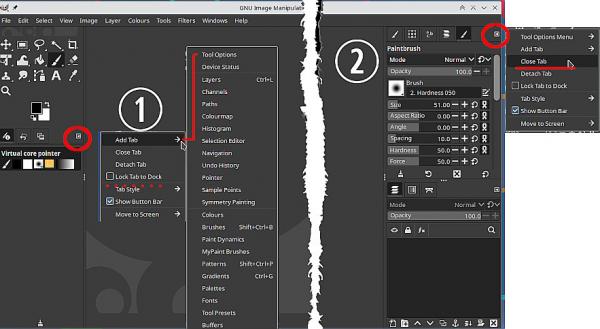
or using the little left pointing arrow which brings up a menu.
(1) Add a Tab and choose Tool Options
(2) Choose close tab.
When in place you can lock any tab using the same menu.
Using Edit Preferences
Edit -> Preferences -> Tool Options and click on Reset Saved Tool Options to Default Values
Edit -> Preferences -> Interface -> Window Management and click on Reset Saved Window Positions to Default Values
Edit -> Preferences -> Input Devices and click on Reset Saved Input Device Settings to Default Values
or using the little left pointing arrow which brings up a menu.
(1) Add a Tab and choose Tool Options
(2) Choose close tab.
When in place you can lock any tab using the same menu.