




Just an alternative to the colorise filter - a little more hands on.
I took this from your Gimp screenshot which seems a bit lighter than the attached xcf - I do not know which is correct, so just an alternative.
(1) colour select from the background (2) the image desaturated (3) new layer filled with selected colour (4) Layer Mode set as HSL Colour.
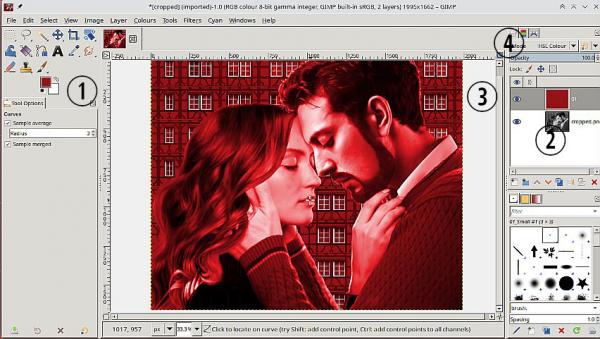
But then I did a little bit of colour matching using the original image.
1 minute 20 seconds example: https://sendvid.com/nei3p6lh Never going to be exact, white frames tend to get coloured.
I took this from your Gimp screenshot which seems a bit lighter than the attached xcf - I do not know which is correct, so just an alternative.
(1) colour select from the background (2) the image desaturated (3) new layer filled with selected colour (4) Layer Mode set as HSL Colour.
But then I did a little bit of colour matching using the original image.
1 minute 20 seconds example: https://sendvid.com/nei3p6lh Never going to be exact, white frames tend to get coloured.