




A bit more on installation.
The top line in the screenshot .....AppData\Local\Programs\GIMP 3\..... is the place you installed Gimp. Leave that alone, it contains the default plugins that come with Gimp. Just a comment, it is a bit of a strange path.
User installed plugins go in that second location, the folder, C:\Users\"yourname"\AppData\Roaming\GIMP\3.0\plug-ins
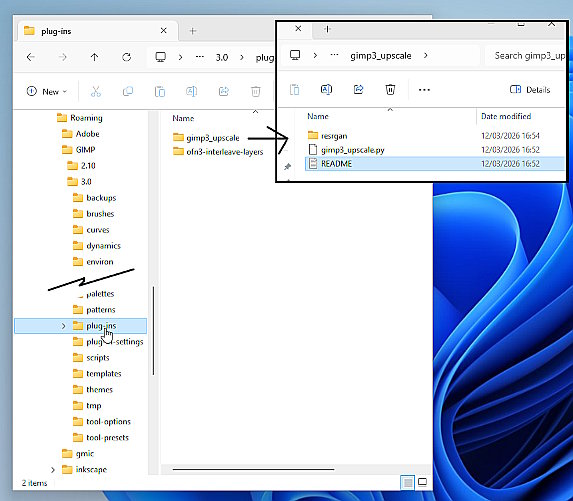
I have tried the plugin in a Windows VM (both 10 and 11) A big plugin 125 MB . Download the zip. Open it and put the whole gimp3_upscale folder in C:\Users\"yourname"\AppData\Roaming\GIMP\3.0\plug-ins. looks like this. The gimp3_upscale folder containing the plugin and a folder of dependencies.
It does register in Filters -> Enhance -> AI Upscale but in the Windows VM running it gives errors ending in not a GPU which could well be a VM issue. The plugin does work in linux. (kubuntu 24.04 / Gimp 3.0.8)
The top line in the screenshot .....AppData\Local\Programs\GIMP 3\..... is the place you installed Gimp. Leave that alone, it contains the default plugins that come with Gimp. Just a comment, it is a bit of a strange path.
User installed plugins go in that second location, the folder, C:\Users\"yourname"\AppData\Roaming\GIMP\3.0\plug-ins
I have tried the plugin in a Windows VM (both 10 and 11) A big plugin 125 MB . Download the zip. Open it and put the whole gimp3_upscale folder in C:\Users\"yourname"\AppData\Roaming\GIMP\3.0\plug-ins. looks like this. The gimp3_upscale folder containing the plugin and a folder of dependencies.
It does register in Filters -> Enhance -> AI Upscale but in the Windows VM running it gives errors ending in not a GPU which could well be a VM issue. The plugin does work in linux. (kubuntu 24.04 / Gimp 3.0.8)