




Ok first whinge from me. Using the appimage. Open -> New, default A5 and CMYK Color set in Advanced Options .
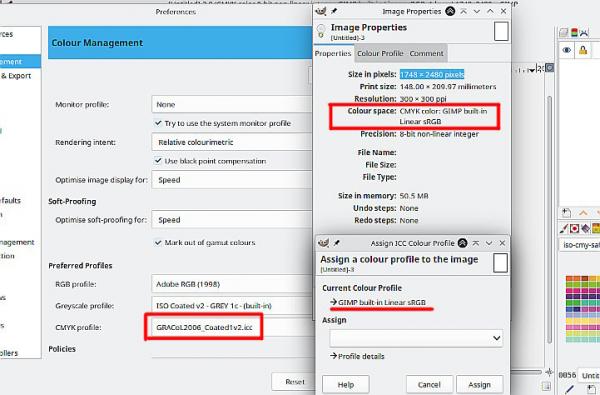
The color profile in Preferences is not used in the new canvas, CMYK image with default Gimp sRGB profile. The same if you set up View -> Colour Management and Soft Proofing. EDIT: OK I forgot to set the profile in File -> New -> Advanced Options but really for a CMYK image it should default to the preferred profile.
With that A5 canvas a large brush is so laggy as to be unusable. Typically a large mypaint watercolour brush but a regular large .vbr as well. As far as I guess, at least 4 times slower than in my regular 3.2.4 appimage.
The color profile in Preferences is not used in the new canvas, CMYK image with default Gimp sRGB profile. The same if you set up View -> Colour Management and Soft Proofing. EDIT: OK I forgot to set the profile in File -> New -> Advanced Options but really for a CMYK image it should default to the preferred profile.
With that A5 canvas a large brush is so laggy as to be unusable. Typically a large mypaint watercolour brush but a regular large .vbr as well. As far as I guess, at least 4 times slower than in my regular 3.2.4 appimage.