




What you can try:
Make an image in CMYK mode using the colours that suffer from out-of-gamut (1) Typically bright colours.
Change the mode to RGB and use the same colours (2)
Now go back to CMYK and those out of gamut colours show as they would print (3)
It is a one way conversion. RGB -> CMYK no going back to the original RGB colours.
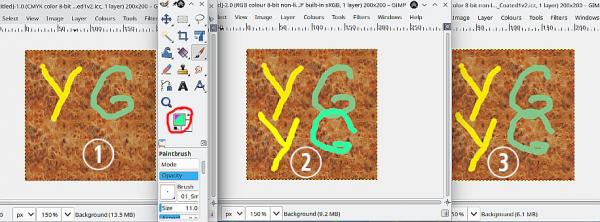
Make an image in CMYK mode using the colours that suffer from out-of-gamut (1) Typically bright colours.
Change the mode to RGB and use the same colours (2)
Now go back to CMYK and those out of gamut colours show as they would print (3)
It is a one way conversion. RGB -> CMYK no going back to the original RGB colours.