

Thread Rating:
  • 0 Vote(s) - 0 Average
  • 1
  • 2
  • 3
  • 4
  • 5
Resize image too blurry (down scale)
#1
Photo 
Is there any way to deal with this?

Here's an example, resize to 25%.
Gimp - blurry. (if choose None, will get terrible aliasing)
Windows Paint - not blurry (but not support alpha).

Original image (cannot attach, said too large): https://1drv.ms/i/c/cfd39d12afb55641/IQB...Jss9bfcMkA
Result-Gimp: https://1drv.ms/i/c/cfd39d12afb55641/IQC...ceDmBBTfrU

   
Result-Windows Paint: https://1drv.ms/i/c/cfd39d12afb55641/IQA...EO4nLDEi9Y
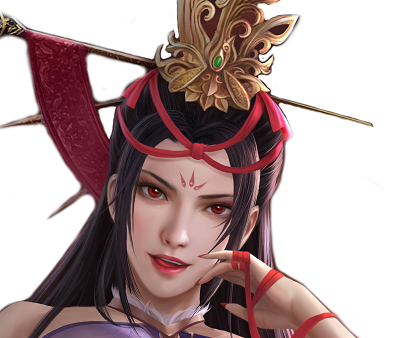
   

Look at the face and hair.

edit:attachment seems didn't display.
Reply
#2
The scaling algorithm to use is LoHalo.
quote: LoHalo method: when you downscale an image thats less than a half of the original size

It looks to me that the MSPaint scale also incorporates an automatic degree of sharpen. As a comparison.
(1) Scaled with Gimp 3.0.8 LoHalo
(2) Your MSPaint example. I can see a small amount of "fringing" that forehead detail for example.
(3) A default value unsharp mask applied to (1).  There are other (possibly better) sharpening tools, I often use one of the gimp_gmic_qt filters.

   
Reply
#3
There is a new filter in version 3 of gimp under enhance, to sharpen which doesn't do a bad job called sharpen deluxe.
I downloaded your file, sharpened but it wont save/export. My antivirus doesn't like it.
(Weird that it let it download but wont save from gimp)

Smile
Reply
#4
(4 hours ago)sallyanne Wrote: There is a new filter in version 3 of gimp under enhance, to sharpen which doesn't do a bad job called sharpen deluxe.
I downloaded your file, sharpened but it wont save/export. My antivirus doesn't like it.
(Weird that it let it download but wont save from gimp)

.png image file is unrelated with virus in general situation, this may just because your settings prevent editing "downloaded from web" file which Windows add a mark.
Reply
#5
(4 hours ago)sallyanne Wrote: There is a new filter in version 3 of gimp under enhance, to sharpen which doesn't do a bad job called sharpen deluxe.
...snip...

That is an addon - a GEGL remix of wavelet-decompose see: https://github.com/LinuxBeaver/GEGL-GIMP...impSharpen

my usual go-to is the gimp_gmic_qt filter FFT Sharpen
Reply
#6
(5 hours ago)rich2005 Wrote: The scaling algorithm to use is LoHalo.
quote: LoHalo method: when you downscale an image thats less than a half of the original size

It looks to me that the MSPaint scale also incorporates an automatic degree of sharpen. As a comparison.
(1) Scaled with Gimp 3.0.8 LoHalo
(2) Your MSPaint example. I can see a small amount of "fringing" that forehead detail for example.
(3) A default value unsharp mask applied to (1).  There are other (possibly better) sharpening tools, I often use one of the gimp_gmic_qt filters.

I check Gmic and found a "Scale Down" filter in Gmic, use Amount=10 and Darkness=0, result seems better, but still cannot get as clear as Windows Paint do.
Reply
#7
(3 hours ago)lyjim Wrote: .
I check Gmic and found a "Scale Down" filter in Gmic, use Amount=10 and Darkness=0, result seems better, but still cannot get as clear as Windows Paint do.

The gmic Scale Down has a section for sharpening, bump that value up. Keep the initial pre-blur on - it used to be in old gimp you had to do that yourself, the new gimp Lo/Hi/ have that built in. If you find a suitable mix of settings, then save that as a "fave" - saves a bit of time when applied again.
Reply


Forum Jump:
