Posts: 1
Threads: 1
Joined: Aug 2021
Reputation:
0
Gimp version:
Hello. Im simplying trying to make newsprint work on a solid color, why doesnt it?
It either blacks out the entire screen, doesnt do anything, or blacks out everything except for where Im trying to apply circles.
I had to apply newsprint cirles on a solid color red background and I went through like 40 hurdles just to put circles on a red background.
Im trying to do that same thing, literally just circles on red text, but it doesnt work?
Doesnt matter if its black on white, white on black, rgb, cmyk, it will do everything besides simply apply circles.
Or it does apply circles, but they are incredibly small, only white (cant be changed despite changing from black on white, rgb, etc) and are actually squares.
This effect was working perfectly a few days ago and Im trying to apply it in the same way and no dice. I opened my older projects to see how I did it, and I try to replicate the process but nothing.
Its really annoying me, Ive been at this on and off for 8 hours and Ive got to get this done.
It can do lines perfectly, but as soon as I ask for circles i get these small white squares (despite selecting circle) that are incredibly far apart so its barely even noticable on my text.
Why cant gimp just work the same way twice
Im so burnt out over this simple issue when I know ive done it countless times. I dont get it.
Posts: 1,462
Threads: 222
Joined: Sep 2018
Reputation:
135
Gimp version:
Operating system(s): Windows 11
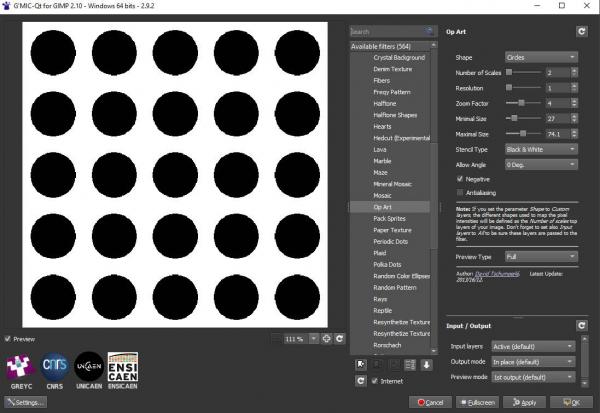
Circles on a background like this ?
Posts: 8,041
Threads: 173
Joined: Oct 2016
Reputation:
1,097
Gimp version:
Operating system(s): Linux
08-30-2021, 08:24 AM
(This post was last modified: 08-30-2021, 09:45 AM by rich2005.)
The newsprint filter is a type of 'artistic' halftoning. (For those who do not know Halftoning = dots on a regular grid, dots varying in size to give an impression of shading.)
A solid colour therefore is a grid of equal sized dots. You can do that manually. While it would be nice for the GEGL filter to do this, it does fail unless there is some variation in the image.
This an example with some gradients introduced next to solid colour: https://i.imgur.com/MtGHTMq.png
There are other ways, as denzjos, the gimp_gmic_qt plugin http://www.gmic.eu has some halftone filters
Another old plugin generates a greyscale image. example: https://i.imgur.com/kCBczm1.png For colour it can be used as an overlay.
You can get that from: https://gimplearn.net/viewtopic.php?t=190
edit: search for alternatives
1) The old (Gimp 2.8) Newsprint plugin. You said you had old projects where it worked, maybe with the old plugin. It does work with Gimp 2.10. If you are using Windows I can provide, linux probably provide (depends on distro) . MacOS - no.
Gives this: https://i.imgur.com/6OR8wq4.jpg
2) In Filters -> Render -> Pattern the unlikely Linear Sinusoid. Looks like this. Note the mode from the Blending Optionsdrop-down menu. https://i.imgur.com/SL77fYo.jpg
Posts: 1,462
Threads: 222
Joined: Sep 2018
Reputation:
135
Gimp version:
Operating system(s): Windows 11
Posts: 1
Threads: 0
Joined: Jun 2026
Reputation:
0
Gimp version:
Operating system(s): Windows 10
(08-30-2021, 10:02 AM)denzjos Wrote: @ dontcareaboutuser, we do care. if you want newsprint on solid text, then blur it first (Filters / Blur /Gaussian Blur) and then use the newsprint plugin.
can you step by step this process? i can get the blur to apply just fine, but the newsprint filter wont apply at all no matter how i mess with the settings...
Posts: 8,041
Threads: 173
Joined: Oct 2016
Reputation:
1,097
Gimp version:
Operating system(s): Linux
2 hours ago
(This post was last modified: 2 hours ago by rich2005.)
@uvilwq Which sub-version of Gimp 3.2 / 3.2.2 / 3.2.4 ? I do think it makes a difference in this case but there are subtle differences.
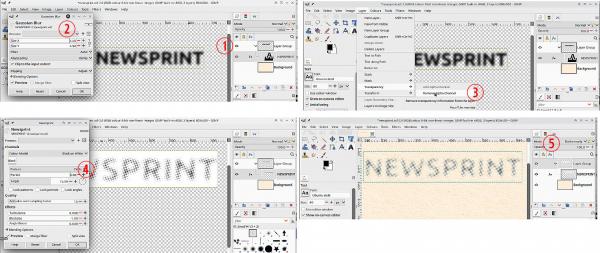
Using Gimp 3.2.4
(1) If you have a coloured background, I suggest putting the text layer in a layer group.
(2) ...and you can gaussian blur the text to your requirement.
(3) The newsprint filter needs a contrasting background to work, easiest way is remove the alpha channel making sure your background colour is white.
(4) Now apply the newsprint filter.
(5) If you have a background, set the layergroup mode to Darken Only (or maybe multiply)
Posts: 37
Threads: 0
Joined: Feb 2024
Reputation:
0
Gimp version:
Operating system(s): Windows Vista or 7, 8, 10 (64-bit)
(08-30-2021, 02:05 AM)dontcareaboutuser Wrote: Cześć. Próbuję po prostu sprawić, aby wydruk gazetowy działał na jednolitym kolorze, dlaczego nie działa?
Albo zaciemnia cały ekran, nic nie robi, albo zaciemnia wszystko poza miejscem, w którym próbuję nałożyć kółka.
Musiałem nałożyć kółka z papieru gazetowego na jednolity czerwony kolor tła i przeszedłem przez około 40 przeszkód, aby umieścić kółka na czerwonym tle.
Próbuję zrobić to samo, dosłownie tylko kółka na czerwonym tekście, ale to nie działa?
Nie ma znaczenia, czy to czarny na białym, biały na czarnym, RGB, CMYK, zrobi wszystko oprócz nałożenia kółek.
Albo nakłada kółka, ale są niewiarygodnie małe, tylko białe (nie można ich zmienić pomimo zmiany z czarnego na białym, RGB itp.) i są w rzeczywistości kwadratami.
Ten efekt działał idealnie kilka dni temu i próbuję zastosować go w ten sam sposób i nic z tego. Otworzyłem swoje starsze projekty, aby zobaczyć, jak to zrobiłem, i próbuję powtórzyć proces, ale nic.
Strasznie mnie to wkurza, siedzę nad tym od 8 godzin i muszę to skończyć.
Program idealnie rysuje linie, ale gdy tylko poproszę o kółka, pojawiają się te małe białe kwadraty (pomimo zaznaczenia kółka), które są niewiarygodnie oddalone od siebie, więc ledwo je widać na tekście.
Czemu Gimp nie może po prostu działać dwa razy tak samo?
Jestem tak wypalony tym prostym problemem, wiedząc, że robiłem to już niezliczoną ilość razy. Nie rozumiem tego.
https://www.youtube.com/watch?v=EI81xWYWoyM
|





