




Looking at your little clip and you using the clone tool.
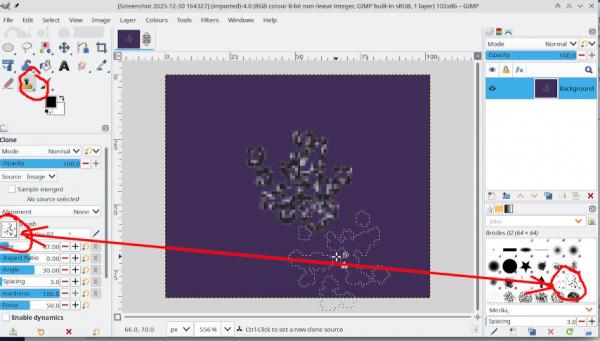
Look at the clone tool options. You do have the tool options dock don't you ?
The clone tool does use whatever brush you have selected, you possibly have something like a "bristles" brush selected. Select one of the others - one of those "round" looking brushes for example. Other tools such as paint / pencil / erase / smudge also use the active brush so changing the tool might not change the cursor.
Have you looked at the manual ? https://docs.gimp.org/3.0/en/gimp-tool-clone.html
This is the same as your other post and
Gimp always has an active tool. To leave clone go to some other tool such as measure ( is safe for beginners )
Looking at your other post about cloning out some text - it depends on
Is the text a Gimp text layer ? - clone is wrong tool
Is the text in its own transparent layer ? - delete it
Is the text just part of another graphics layer ? - yes use the clone tool
Edit: Just a note, you can change the cursor in Edit -> Preferences -> Input Devices but it is usually best to have the brush outline showing.
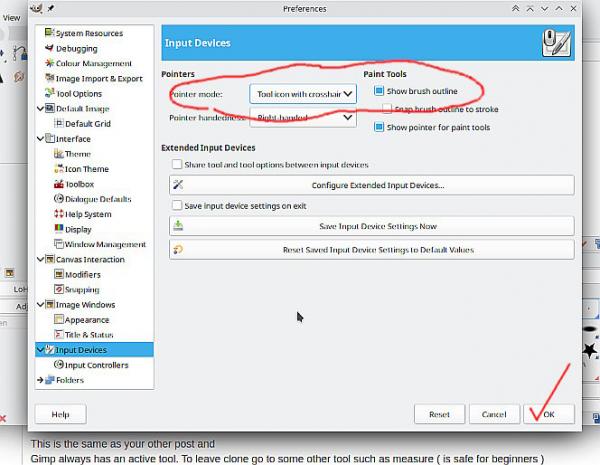
Look at the clone tool options. You do have the tool options dock don't you ?
The clone tool does use whatever brush you have selected, you possibly have something like a "bristles" brush selected. Select one of the others - one of those "round" looking brushes for example. Other tools such as paint / pencil / erase / smudge also use the active brush so changing the tool might not change the cursor.
Have you looked at the manual ? https://docs.gimp.org/3.0/en/gimp-tool-clone.html
This is the same as your other post and
Gimp always has an active tool. To leave clone go to some other tool such as measure ( is safe for beginners )
Looking at your other post about cloning out some text - it depends on
Is the text a Gimp text layer ? - clone is wrong tool
Is the text in its own transparent layer ? - delete it
Is the text just part of another graphics layer ? - yes use the clone tool
Edit: Just a note, you can change the cursor in Edit -> Preferences -> Input Devices but it is usually best to have the brush outline showing.