| Welcome, Guest |
You have to register before you can post on our site.
|
| Latest Threads |
new plugin colour grading...
Forum: Extending the GIMP
Last Post: rich2005
Today, 08:29 AM
» Replies: 5
» Views: 628
|
ExifToolGUI and ExifTool ...
Forum: Other graphics software
Last Post: denzjos
Yesterday, 09:07 AM
» Replies: 14
» Views: 17,048
|
Langage français de l'int...
Forum: OSX
Last Post: rich2005
05-06-2026, 07:28 PM
» Replies: 1
» Views: 521
|
Locally Installed Help is...
Forum: General questions
Last Post: rich2005
05-06-2026, 10:10 AM
» Replies: 3
» Views: 702
|
scheme : error in vector
Forum: Extending the GIMP
Last Post: geka
05-06-2026, 05:40 AM
» Replies: 2
» Views: 321
|
Can a plugin be made to s...
Forum: Other graphics software
Last Post: firefox
05-06-2026, 02:23 AM
» Replies: 0
» Views: 117
|
Why does this.......
Forum: Watercooler
Last Post: CmykStudent_
05-05-2026, 08:41 PM
» Replies: 2
» Views: 671
|
How to change text inside...
Forum: General questions
Last Post: denzjos
05-05-2026, 06:39 PM
» Replies: 5
» Views: 833
|
logo for website profile ...
Forum: General questions
Last Post: tbint62
05-05-2026, 05:48 PM
» Replies: 6
» Views: 858
|
Requesting testers for CM...
Forum: General questions
Last Post: rich2005
05-05-2026, 12:28 PM
» Replies: 8
» Views: 896
|
|
|
| how to blend a low res with same high res photo |
|
Posted by: jellimon - 05-20-2024, 01:06 AM - Forum: General questions
- Replies (2)
|
 |
Hi all
Very much a beginner here
I have two photograph's that are of the same subject, exactly the same shot, one is a high resolution B&W and one is lower resolution colour,
How could I blend the two together and retain the High Resolution AND add the colour from the Lower resolution photograph to achieve a high resolution colour result.
Is it possible.
Many thanks
|

|
|
| Editing Real Estate Photos |
|
Posted by: festus - 05-19-2024, 09:05 PM - Forum: General questions
- Replies (8)
|
|
All,
I use GIMP to edit raw ambient and flash real estate photos. I have GIMP 2.10.38 loaded onto a Windows 11 system. I have 16 giga-bytes of memory and a very fast processor with over 5000 giga-byes of storage.
When I load, as layers, an ambient and flash photo, select the ambient photo, and select anything from the Colors menu, nothing has an effect on it. When I try editing the flash photo everything from the Colors menu works. I need to edit the ambient photo first.
In order to see if I can correct the situation, I have
- removed any non-CR2 files related to the files I need to edit
- reloaded GIMP
- shutdown the system for a few hours while I cool down
I am open to any suggestions/corrections/modifications that anyone may have.
Thanks,
Festus
.
|
|
|
|
| back to GIMP after years - now i want to dive inot all that |
|
Posted by: st_barr - 05-16-2024, 06:26 PM - Forum: Other graphics software
- Replies (2)
|
|
good evening dear Sir,
hello dear GIMP-Experts
i have used GIMP years before - and now i gladly found back to gimp.
i now want to dive into all that - working with GIMP. I have found allready that there were good handbooks and things like that.
btw: one question regarding the creation of pics - its a Question about AI, e.g. the possibilities and limits: can you, for example, recreate photos with AI? So, for example, if I say, take a photo of xy in the situation at xz.
E.g. a man gets on a bus!? or so?!
Dear GIMP.-Experts - i will start over with the work on GIMP i have lots of questions. so expect me to come back on a regular basis.
greetings
st barr
|
|
|
|
 Can't use Color to alpha on that one
 |
|
Posted by: PixLab - 05-16-2024, 06:27 AM - Forum: General questions
- Replies (6)
|
 |
I wanted to compare a @Ofnuts' method to one of mines here > https://www.reddit.com/r/GIMP/comments/1...xcept_for/
I did the Ofnuts method first, (the top layers in the xcf below) then I wanted to Color to Alpha as a starter of mine, and it does not work on this very specific layer (the visible one, and the one above)
Can you try it?
Open the Xcf and directly go to color to alpha (whatever color), and if you find out why it is not working, please tell me, like that this evening I would be able to go to sleep a bit less stupid 
The .7z ➤ https://sendgb.com/rpv37MwBYRf 2mb
or the .xcf ➤ https://sendgb.com/rMuRLSdV9Ql 4.5mb
If you drag and drop that layer in the tool box to open as a new image, yes color to alpha will work, but what I want to know is why it is not working in that xcf
EDIT: Never mind, I'm stupid, I just checked the menu Select and None was not grayed out.... 
Morality of the story, when something does not work, don't forget the basics ➤ check the Select
Although I cannot find out where is that selected pixel... 
|
|
|
|
 Does Script-Fu support input/output of the files?
 |
|
Posted by: esm - 05-15-2024, 09:38 PM - Forum: Extending the GIMP
- Replies (4)
|
|
Hi guys, I'm using Gimp 2.10.36 and need to find the coordinates of selected bounding box using this python code:
Code:
from gimpfu import *

import os


def foo():

    selection, x1, y1, x2, y2 = pdb.gimp_selection_bounds(gimp.image_list()[0])

    if not selection:

        pdb.gimp_message("No selection")

    else:

        gimp.message('%d, %d, %d, %d' % (y1, x1, y2, x2))

register(...)

main()
I'm wondering if there is a way to write the contents of a gimp.message(the coordinates) directly to a txt file? Can you please provide some examples?
This is the output I want to get - a created txt file with the same name as the image and 4 coordinates inside:

This is the code I found but it's written in Scheme (Lisp dialect) and I don't understand how to rewrite it in python.
Code:
(define outport (open-output-file "samplefile.txt")) (display "Hello" outport)

(newline outport)

(display "World" outport)

(close-output-port outport)
|
|
|
|
| SOOOOOOOOOOO close in cleaning up an image |
|
Posted by: 977 - 05-15-2024, 04:28 AM - Forum: General questions
- Replies (6)
|
|
hi all,
i am sooooooooooooo close in cleaning up an image.....something minor must be keeping me from moving on. i could please use your help
i'm following this tutorial here.
https://www.youtube.com/watch?v=J0R3XvrsC3c
if you could please watch a few seconds at 9:47....see how is paintbrush is cleaning it up? when i do it, its just painting black on there (my settings for paintbrush are the same as is, i've checked them a million times, and everything up to this point i've matched his results so it has to be something minor)
i want to throw my computer out the window right now! i'm so close and this is the most important part.
maybe he clicked on something? the problem with tutorials is that if they click without saying they clicked, its impossible to tell ya know?
thank you for your help
bonus question - have you all heard of this dude before? is he good? should i rely on him for future tutorials? he was honest in his tutorial - he said theres a million ways to accomplish this but this method is the most straightforward
|
|
|
|
| Some old pixel art done in GIMP(2019-2020) |
|
Posted by: TumbleRocks - 05-14-2024, 06:52 PM - Forum: Gallery
- Replies (9)
|
 |
Hi all, at the risk of being a doofus, i wanted to share some work i did a few years back(I think it is better quality than what i have shared before). I want to post it somewhere, instead of letting it rot on my hard drive. It is pixel art from a collab that never got published.
Here is the collab: https://pixelation.org/index.php?topic=31210.0
I'm not a very experienced pixel artist, so participating in this collab was a good learning experience for me, and taught me a lot about GIMP and graphic art in general. Sadly, i haven't been doing as much graphic art lately, though I do occasionally still find the opportunity to open GIMP for one reason or another, and very much appreciate that this software exists. Anyway let me post images:
T2 Mirage:
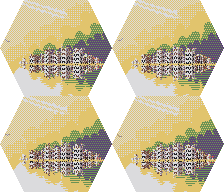
T7 RNA Stream:

T31 Dr. Devil(MD):

T40 Hoax Man:

...well, I'm not sure how to upscale the attachments in the post, and i kind of prefer to submit in the original size. Maybe there is a way to magnify in the BB prefs? IDK, if people respond with interest, I can provide some progress shots and reference stuff illustrating the process i used.
Take Care!
|
|
|
|
|


