



04-08-2024, 04:08 PM
Hello all. I have Google'd this issue and have seen numerous posts in various forums with no real resolution. I am using Gimp v2.10.30 on a Windows 11 PC. The problem I am having and cannot seem to resolve is that upon printing, Gimp is reverting larger format documents to letter size. Here are the steps I am taking in the current example I am dealing with.
1. Create a new document that is 24" x 36" to be printed to an Epson SC-F570, large format sublimation printer.
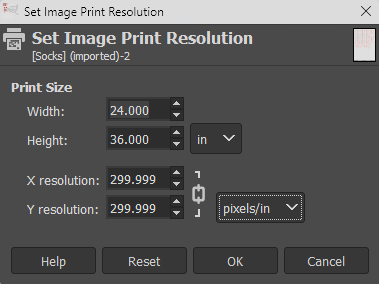
2. Add all images to blank document.
3. In "Page Setup", change "Size" to "User-Defined" and "Source" to "Roll Paper" (as needed for printer in question).

4. Click "Print", bringing up the Gimp print dialogue.
5. Click "More settings" to launch the printer specific settings dialogue.
6. Change "Document Size" to "User-Defined" and "Output Size" to 24" x 36".
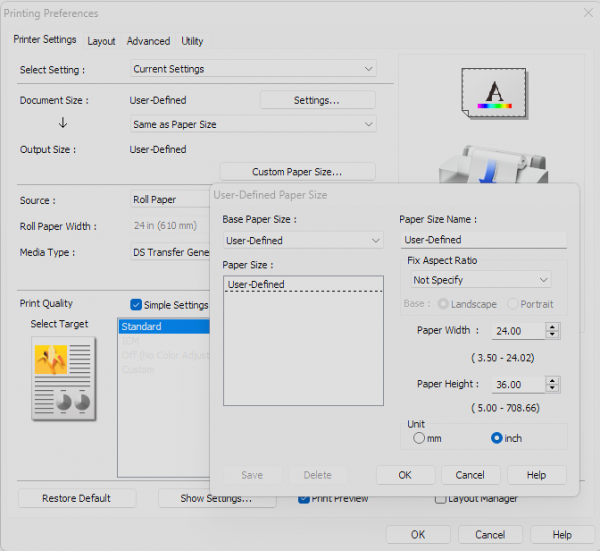
7. Click "OK" on printer specific dialogue.
8. Click "Print" on Gimp print dialogue, which brings up the printer specific print preview.
9. Document size reverted to 8.5" x 11"
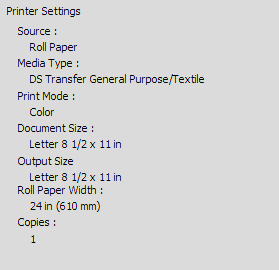
I have done this over and over again. Regardless of how many ways I confirm the intended document and print size to be 24" x 36", once I get to the last step where I would hit "Print" for the final time to actually start printing, the document size is changed back to 8.5" x 11". This does not happen with other graphics software using the same process, computer and printer. This ONLY happens using Gimp. Has anyone experienced this and actually resolved it? Pulling what's left of my hair out trying to get Gimp to print larger formats properly. Thank you so much for any input.
1. Create a new document that is 24" x 36" to be printed to an Epson SC-F570, large format sublimation printer.
2. Add all images to blank document.
3. In "Page Setup", change "Size" to "User-Defined" and "Source" to "Roll Paper" (as needed for printer in question).
4. Click "Print", bringing up the Gimp print dialogue.
5. Click "More settings" to launch the printer specific settings dialogue.
6. Change "Document Size" to "User-Defined" and "Output Size" to 24" x 36".
7. Click "OK" on printer specific dialogue.
8. Click "Print" on Gimp print dialogue, which brings up the printer specific print preview.
9. Document size reverted to 8.5" x 11"
I have done this over and over again. Regardless of how many ways I confirm the intended document and print size to be 24" x 36", once I get to the last step where I would hit "Print" for the final time to actually start printing, the document size is changed back to 8.5" x 11". This does not happen with other graphics software using the same process, computer and printer. This ONLY happens using Gimp. Has anyone experienced this and actually resolved it? Pulling what's left of my hair out trying to get Gimp to print larger formats properly. Thank you so much for any input.

