




Hello,
first time posting here. I'm a casual GIMP user, mainly using it for creating Sim Racing Liveries.
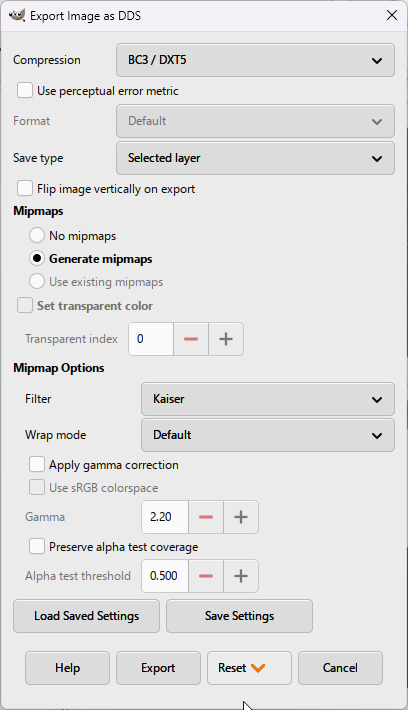
I recently experience an error message when exporting to DDS format using BC3/DXT5 or BC7. I'm on GIMP 3.2.4 using Linux, same happens on 3.2.2. Only 3.0.8 seems to work for BC3/DXT5 (BC7 is ot supported here).
I tested also on my Windows 11 Laptop with Version 3.2.4, also doesn't work here. It also seems not to be a picture issues. Old pictures where the export to BC3/DXT5 worked before, will fail during export on 3.2.4 too.
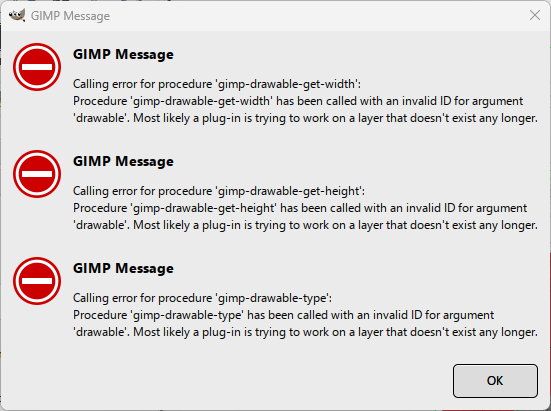
Any ideas based on the attached error message? Any hints are welcome.
Michael
first time posting here. I'm a casual GIMP user, mainly using it for creating Sim Racing Liveries.
I recently experience an error message when exporting to DDS format using BC3/DXT5 or BC7. I'm on GIMP 3.2.4 using Linux, same happens on 3.2.2. Only 3.0.8 seems to work for BC3/DXT5 (BC7 is ot supported here).
I tested also on my Windows 11 Laptop with Version 3.2.4, also doesn't work here. It also seems not to be a picture issues. Old pictures where the export to BC3/DXT5 worked before, will fail during export on 3.2.4 too.
Any ideas based on the attached error message? Any hints are welcome.
Michael
