Posts: 4
Threads: 1
Joined: Jun 2026
Reputation:
0
Gimp version:
Operating system(s): Windows 10
Hi,
when I click on an image with the zoom tool, I zoom to the pixel I'm clicking on;
when I scroll the mousewheel while pointing to the same pixel, at a certain point the image "centers" itself, and I end up in another spot. This is annoying, especially when zooming towards the corners of a selection in order to adjust it precisely.
In PS there is a way to change to behavior of the zoom (Overscroll checkbox).
Is there a way to make the mousewheel behave like the zoom tool in GIMP?
Thanks in advance.
Posts: 8,038
Threads: 172
Joined: Oct 2016
Reputation:
1,096
Gimp version:
Operating system(s): Linux
Yesterday, 12:36 PM
(This post was last modified: Yesterday, 12:38 PM by rich2005.)
(Yesterday, 07:55 AM)ScanEditor Wrote: ...snip...
In PS there is a way to change to behavior of the zoom (Overscroll checkbox).
Is there a way to make the mousewheel behave like the zoom tool in GIMP?
I can not quite get your problem with zoom. ctrl-wheel zooms ok for me.
However if you want to set up the mouse wheel, it goes like this:
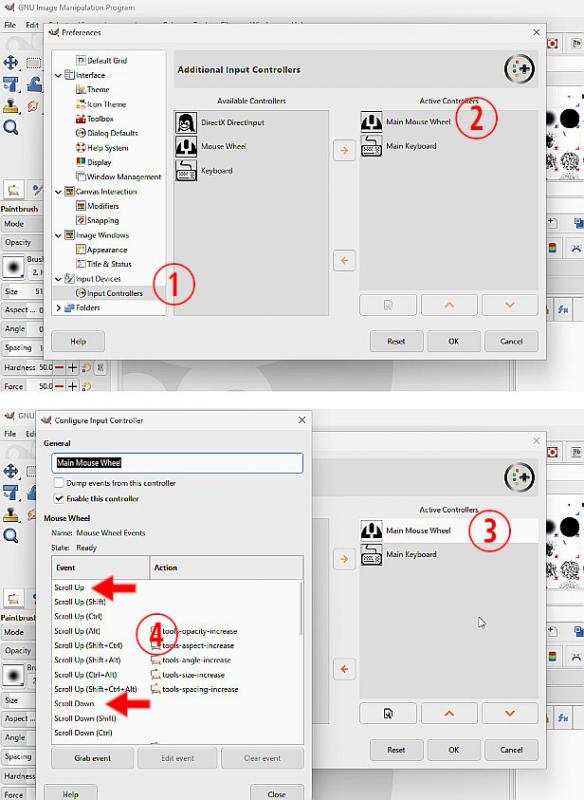
Edit -> Preferences -> Input Devices -> Input Controllers (1) brings up a dialogue with Main Mouse Wheel (2)
Click on Main Mouse Wheel (3) and you get a dialogue to set mouse wheel actions (4)
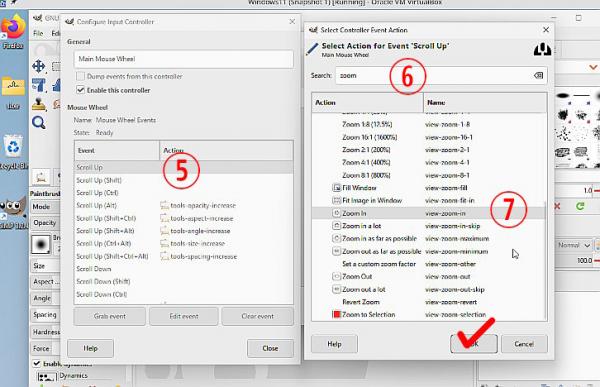
Click on Scroll Up (5) and you get a Select Action dialogue. Search for zoom (6) and set Zoom In (7)
Repeat (5) -> (7) for Scroll Down and Zoom Out.
OK everything to back out in to Gimp.
Posts: 4
Threads: 1
Joined: Jun 2026
Reputation:
0
Gimp version:
Operating system(s): Windows 10
Yesterday, 08:54 PM
(This post was last modified: Yesterday, 08:55 PM by ScanEditor.)
(Yesterday, 12:36 PM)rich2005 Wrote: (Yesterday, 07:55 AM)ScanEditor Wrote: ...snip...
In PS there is a way to change to behavior of the zoom (Overscroll checkbox).
Is there a way to make the mousewheel behave like the zoom tool in GIMP?
I can not quite get your problem with zoom. ctrl-wheel zooms ok for me.
However if you want to set up the mouse wheel, it goes like this:
Edit -> Preferences -> Input Devices -> Input Controllers (1) brings up a dialogue with Main Mouse Wheel (2)
Click on Main Mouse Wheel (3) and you get a dialogue to set mouse wheel actions (4)
Click on Scroll Up (5) and you get a Select Action dialogue. Search for zoom (6) and set Zoom In (7)
Repeat (5) -> (7) for Scroll Down and Zoom Out.
OK everything to back out in to Gimp.
I'd like the default behavior to be CTRL + scroll without having to press CTRL every time.
Maybe it's a feature request, then, not an information request.
Something along the lines of a "locked-view-zoom-in" event, that I can bind to Main Mouse Wheel - Scroll Up.
I'll head to the appropriate board and see if there's already something along those lines.
Thank you and good night.
Posts: 8,038
Threads: 172
Joined: Oct 2016
Reputation:
1,096
Gimp version:
Operating system(s): Linux
(Yesterday, 08:54 PM)ScanEditor Wrote: I'd like the default behavior to be CTRL + scroll without having to press CTRL every time.
Maybe it's a feature request, then, not an information request.
Something along the lines of a "locked-view-zoom-in" event, that I can bind to Main Mouse Wheel - Scroll Up.
I'll head to the appropriate board and see if there's already something along those lines.
Thank you and good night.
...and that is what I showed in the screenshots. The mousewheel on its own zooms in and out.
Posts: 4
Threads: 1
Joined: Jun 2026
Reputation:
0
Gimp version:
Operating system(s): Windows 10
(Today, 06:46 AM)rich2005 Wrote: (Yesterday, 08:54 PM)ScanEditor Wrote: I'd like the default behavior to be CTRL + scroll without having to press CTRL every time.
Maybe it's a feature request, then, not an information request.
Something along the lines of a "locked-view-zoom-in" event, that I can bind to Main Mouse Wheel - Scroll Up.
I'll head to the appropriate board and see if there's already something along those lines.
Thank you and good night.
...and that is what I showed in the screenshots. The mousewheel on its own zooms in and out.
It's self-centering, which can be undesirable.
Let's say I have a scan with extra stuff around the page: I'm making a selection with the crop tool, then zooming in to fine-tune corners and edges... I point the cursor near a corner, start scrolling and end up with the corner I'm interested in out of view.
If I use CTRL I can zoom in and out where my cursor is, but I have to press it every single time, and it slows zooming down (scroll goes 50% - 66.7% - 100%, CTRL+scroll goes 50% - 55% - 60.5% - 66.6% - 73.2% - 80.5% - 88.6% - 97.4%)
That's with the crop tool, since I can keep CTRL down with no adverse effect, but if I wanted to fine-tune a selection, I'd have to let go of CTRL and press it again every single time, since CTRL+drag on a vertex just creates another selection anyway.
Posts: 8,038
Threads: 172
Joined: Oct 2016
Reputation:
1,096
Gimp version:
Operating system(s): Linux
(6 hours ago)ScanEditor Wrote: It's self-centering, which can be undesirable.
Let's say I have a scan with extra stuff around the page: I'm making a selection with the crop tool, then zooming in to fine-tune corners and edges... I point the cursor near a corner, start scrolling and end up with the corner I'm interested in out of view.
If I use CTRL I can zoom in and out where my cursor is, but I have to press it every single time, and it slows zooming down (scroll goes 50% - 66.7% - 100%, CTRL+scroll goes 50% - 55% - 60.5% - 66.6% - 73.2% - 80.5% - 88.6% - 97.4%)
That's with the crop tool, since I can keep CTRL down with no adverse effect, but if I wanted to fine-tune a selection, I'd have to let go of CTRL and press it again every single time, since CTRL+drag on a vertex just creates another selection anyway.
It is the self centering bit that I do not follow. Set the mouse wheel as previously described and it zooms in (or out) centered on the cursor, the same as using the zoom tool.
For those that might come across this post a 1 minute video https://sendvid.com/ivohcnzd (no audio) showing scroll wheel only.
Of course you do not want that. Put in a feature request to the Gimp Developers. https://gitlab.gnome.org/GNOME/gimp/-/issues
Posts: 4
Threads: 1
Joined: Jun 2026
Reputation:
0
Gimp version:
Operating system(s): Windows 10
(5 hours ago)rich2005 Wrote: (6 hours ago)ScanEditor Wrote: It's self-centering, which can be undesirable.
Let's say I have a scan with extra stuff around the page: I'm making a selection with the crop tool, then zooming in to fine-tune corners and edges... I point the cursor near a corner, start scrolling and end up with the corner I'm interested in out of view.
If I use CTRL I can zoom in and out where my cursor is, but I have to press it every single time, and it slows zooming down (scroll goes 50% - 66.7% - 100%, CTRL+scroll goes 50% - 55% - 60.5% - 66.6% - 73.2% - 80.5% - 88.6% - 97.4%)
That's with the crop tool, since I can keep CTRL down with no adverse effect, but if I wanted to fine-tune a selection, I'd have to let go of CTRL and press it again every single time, since CTRL+drag on a vertex just creates another selection anyway.
It is the self centering bit that I do not follow. Set the mouse wheel as previously described and it zooms in (or out) centered on the cursor, the same as using the zoom tool.
For those that might come across this post a 1 minute video https://sendvid.com/ivohcnzd (no audio) showing scroll wheel only.
Of course you do not want that. Put in a feature request to the Gimp Developers. https://gitlab.gnome.org/GNOME/gimp/-/issues
I have it configured exactly as you show in the video.
If you zoom near the edges of the image, you get what I'm talking about.
See here (thanks for showing me that website, I didn't know about it, it's pretty neat!)
https://sendvid.com/0bqvs7ce
First is wheel alone, second is CTRL+wheel
Posts: 8,038
Threads: 172
Joined: Oct 2016
Reputation:
1,096
Gimp version:
Operating system(s): Linux
I see what you mean, With a canvas smaller than the Gimp window the cursor position remains fixed in the window until
the canvas is zoomed to larger than the window.
No fix that I know of, just reposition the cursor to suit.
|




