




12-03-2025, 11:27 AM
(This post was last modified: 12-03-2025, 11:31 AM by Bart Simpson.)
Hello,
I come to ask you for help because I can’t use the tool 'deformation by cage' correctly on Gimp at all.
My project is yet simple:
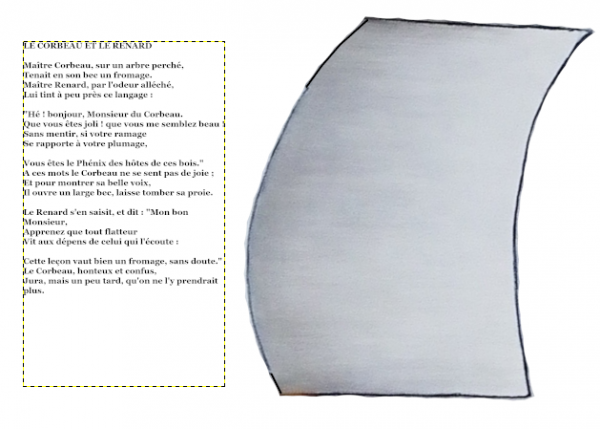
1/ In image 1: we see the sail of a boat and a text (I took "fox and raven" for example = "Le corbeau et le renard").
The goal is to stick this text on the sail, and therefore to deform it in a rounded way to follow the convex curve of the sail. To give the impression that one has written directly on the fabric on the sail before it inflates.
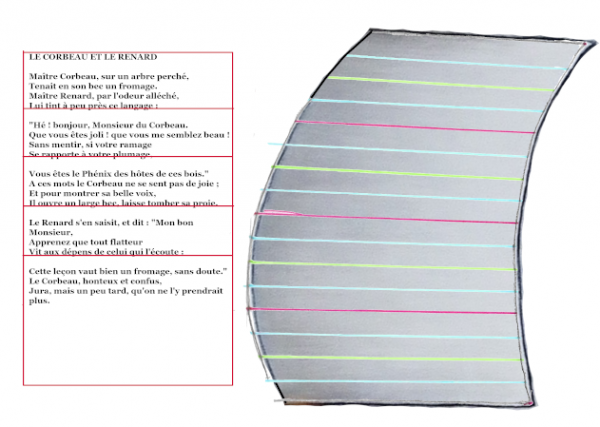
2/ On image 2: I have drawn a red grid around the text, a forecast of the transformation cage in order to place its handles regularly according to parallel horizontal lines.
Then on the sail I traced color lines to have marks to follow when deforming the cage. These color lines are slightly radiating towards a point far to the right, like the spokes of a bicycle wheel.
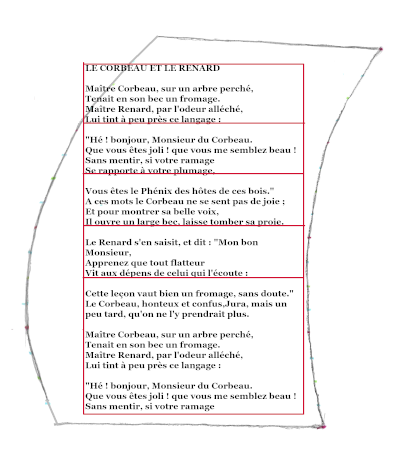
3/ In image 3: I placed the framed text in its red grid on the sail. The text is pixelated of course. It is no longer strictly speaking 'of the text' but 'an image'.
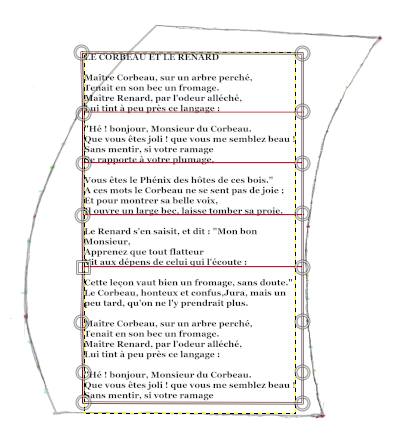
4/ In image 4: I created a deformation cage around the pixelated text, placing the handles regularly thanks to the red grid.
5/ In image 5: I added the radiant color lines to guide my deformation.
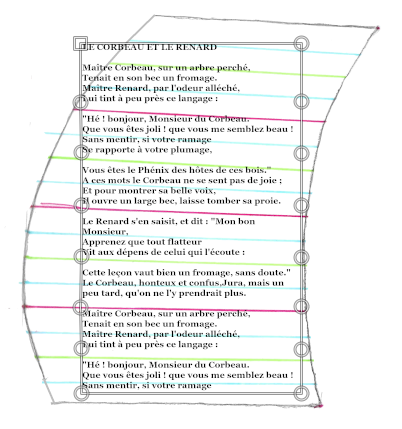
6/ In image 6: I moved the handles of the cage to the ends of the radiating lines.
The result is: completely nonsense!
The lines of text being 'lines' should have remained 'lines' but positioned in a radiating manner in order to follow the guide lines. There is no reason for lines of text to become curved waves anyhow.
Even worse: the distorted pixelated text comes straight out of the cage at the top left ("the crow and the fox" = "Le corbeau et le renard" as well as the beginning of the first paragraph come out of the cage).
In addition, there is the top-left corner of the original undistorted text that has remained apparent, it is not serious, it can easily be erased).
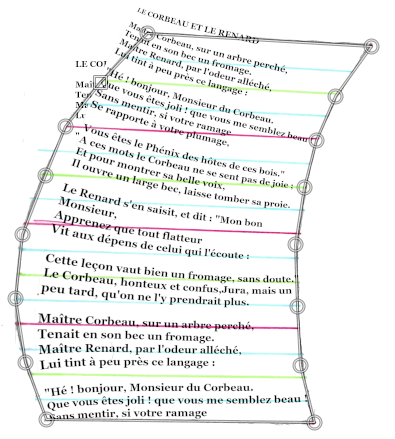
7-8/ Image 7 and 8: the final result is completely missed.
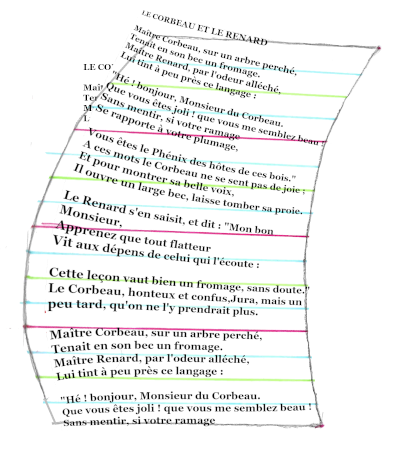
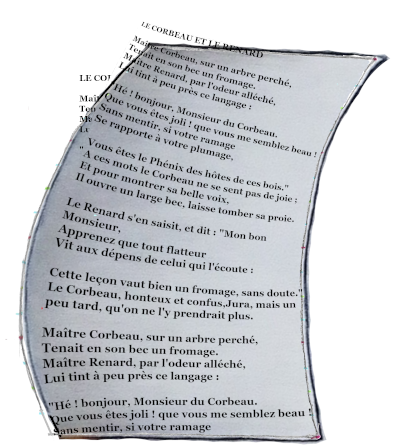
I imagined that the tool «deformation by cage» stuck the image on an elastic surface (like a balloon) that one could stretch at will to take another shape. But at this rate, pixelated text has no reason to leave the elastic surface.
I thought at first that my version of Gimp had a bug, that a virus had eaten a line of code from the software.
But I have 2 computers: a Mac and a PC on which I installed each its version of Gimp (Mac version and PC version, so 2 clearly different versions). I downloaded these versions of Gimp directly from the official website http://www.gimp. Then they are clean versions.
It is therefore that I did not understand at all how the deformation cage is used.
Can you advise me on how to distort this text to stick it neatly on the sail?
I thank you for your help
I come to ask you for help because I can’t use the tool 'deformation by cage' correctly on Gimp at all.
My project is yet simple:
1/ In image 1: we see the sail of a boat and a text (I took "fox and raven" for example = "Le corbeau et le renard").
The goal is to stick this text on the sail, and therefore to deform it in a rounded way to follow the convex curve of the sail. To give the impression that one has written directly on the fabric on the sail before it inflates.
2/ On image 2: I have drawn a red grid around the text, a forecast of the transformation cage in order to place its handles regularly according to parallel horizontal lines.
Then on the sail I traced color lines to have marks to follow when deforming the cage. These color lines are slightly radiating towards a point far to the right, like the spokes of a bicycle wheel.
3/ In image 3: I placed the framed text in its red grid on the sail. The text is pixelated of course. It is no longer strictly speaking 'of the text' but 'an image'.
4/ In image 4: I created a deformation cage around the pixelated text, placing the handles regularly thanks to the red grid.
5/ In image 5: I added the radiant color lines to guide my deformation.
6/ In image 6: I moved the handles of the cage to the ends of the radiating lines.
The result is: completely nonsense!
The lines of text being 'lines' should have remained 'lines' but positioned in a radiating manner in order to follow the guide lines. There is no reason for lines of text to become curved waves anyhow.
Even worse: the distorted pixelated text comes straight out of the cage at the top left ("the crow and the fox" = "Le corbeau et le renard" as well as the beginning of the first paragraph come out of the cage).
In addition, there is the top-left corner of the original undistorted text that has remained apparent, it is not serious, it can easily be erased).
7-8/ Image 7 and 8: the final result is completely missed.
I imagined that the tool «deformation by cage» stuck the image on an elastic surface (like a balloon) that one could stretch at will to take another shape. But at this rate, pixelated text has no reason to leave the elastic surface.
I thought at first that my version of Gimp had a bug, that a virus had eaten a line of code from the software.
But I have 2 computers: a Mac and a PC on which I installed each its version of Gimp (Mac version and PC version, so 2 clearly different versions). I downloaded these versions of Gimp directly from the official website http://www.gimp. Then they are clean versions.
It is therefore that I did not understand at all how the deformation cage is used.
Can you advise me on how to distort this text to stick it neatly on the sail?
I thank you for your help