




I keep forgetting you are using Gimp 2.10  ...thus... using an old script (attached - goes in your user scripts folder)
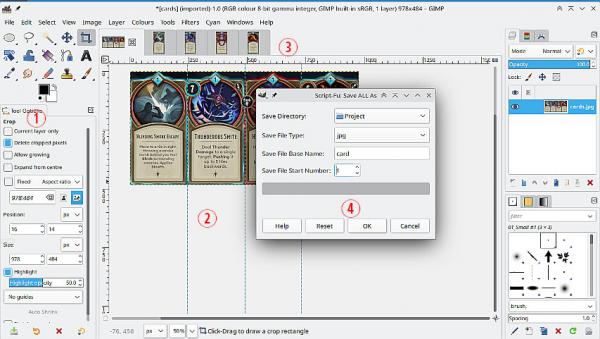
(1) A bit of pre-editing, use the crop tool to trim top / bottom / sides
(2) Add guides where you want the split.
(3) Image -> Slice Using Guides to make new images.
(4) File -> Save ALL As using that old script (find it bottom of File menu).
Edit: For those using Gimp 3. Almost the same except use the batcher plugin to export all open images.
...thus... using an old script (attached - goes in your user scripts folder)(1) A bit of pre-editing, use the crop tool to trim top / bottom / sides
(2) Add guides where you want the split.
(3) Image -> Slice Using Guides to make new images.
(4) File -> Save ALL As using that old script (find it bottom of File menu).
Edit: For those using Gimp 3. Almost the same except use the batcher plugin to export all open images.