




01-05-2026, 01:07 AM
(This post was last modified: 01-05-2026, 01:49 AM by sallyanne.
Edit Reason: More info
)
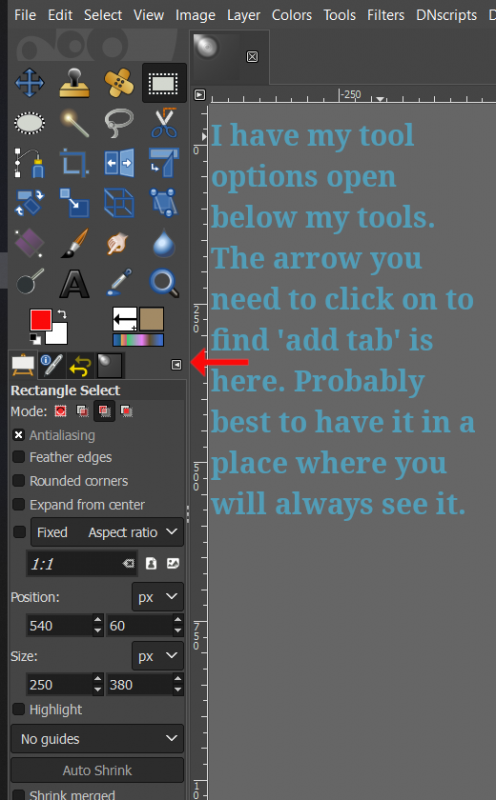
As for finding your palettes. If you are using tabs for your docks you will have an < arrow at the right top hand corner of them. Click on it and - add new tab - then look at the drop down menu that was opened and click on palettes.
If not you can do it by clicking on the top menu 'window's - add dockable dialogs - then palettes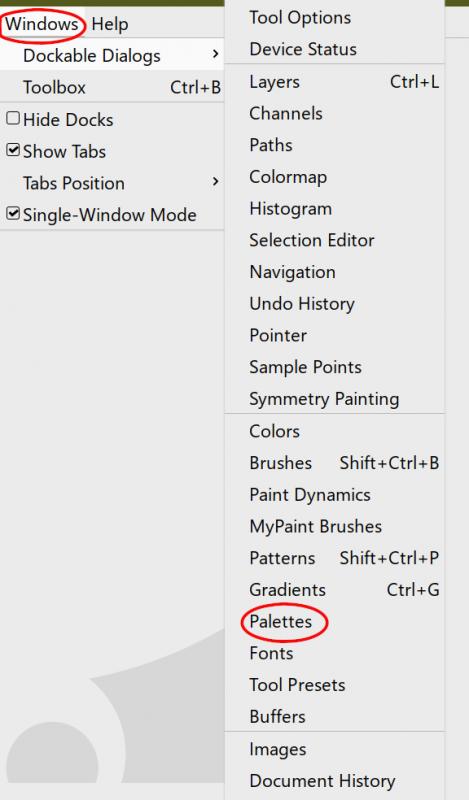
EDIT : If you do not want to lose them again, go to preferences under the Edit menu and click on Window management. Check save window positions on exit and click on save window positions now.
Also in your tabs you can lock the tabs so you do not lose them. Right click on the arrow 'while you have a certain tab activated' (top right corner) and click on 'Lock tab to dock'.
As far as I know you have to do this for each tab - I do not know of a way to do them all tabs at once.
If not you can do it by clicking on the top menu 'window's - add dockable dialogs - then palettes
EDIT : If you do not want to lose them again, go to preferences under the Edit menu and click on Window management. Check save window positions on exit and click on save window positions now.
Also in your tabs you can lock the tabs so you do not lose them. Right click on the arrow 'while you have a certain tab activated' (top right corner) and click on 'Lock tab to dock'.
As far as I know you have to do this for each tab - I do not know of a way to do them all tabs at once.
