




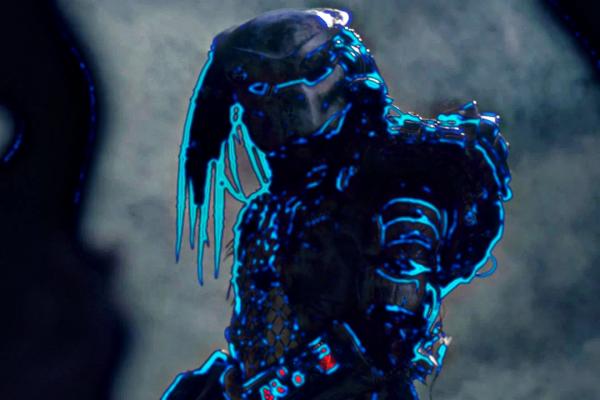
What I did: Copy the original layer to a new layer. Go to "Filters / Artistic / Photocopy" on the new layer. Use the sliders to get the desired contours. Copy this layer three or more times and color these three (or more) layers with different shades of blue. Blur this layers (Filters / Blur / Gaussian Blur). Set the layer mode of these three (or more) layers to "Grain Merge." Play with the "Opacity" of these three layers and create a new layer from these three layers with "New from Visible" and use "Colors / Curves" to optimize the color. Then 'Filters / Enhance / Sharpen'
Thread Rating:
|
Help with making this effect look more realistic
|
|
« Next Oldest | Next Newest »
|
| Messages In This Thread |
|
Help with making this effect look more realistic - by Tygra - 01-09-2026, 09:57 PM
RE: Help with making this effect look more realistic - by sallyanne - 01-10-2026, 12:16 AM
RE: Help with making this effect look more realistic - by denzjos - 01-10-2026, 09:33 AM
RE: Help with making this effect look more realistic - by rich2005 - 01-10-2026, 09:45 AM
RE: Help with making this effect look more realistic - by Tygra - 01-10-2026, 01:37 PM
RE: Help with making this effect look more realistic - by Tygra - 01-13-2026, 11:43 AM
RE: Help with making this effect look more realistic - by denzjos - 01-13-2026, 04:43 PM
RE: Help with making this effect look more realistic - by Tygra - 01-14-2026, 09:22 AM
RE: Help with making this effect look more realistic - by denzjos - 01-14-2026, 06:30 PM
|