




I am not sure what you require. Gimp is not a 3D editor but I think you might want a perspective transform.
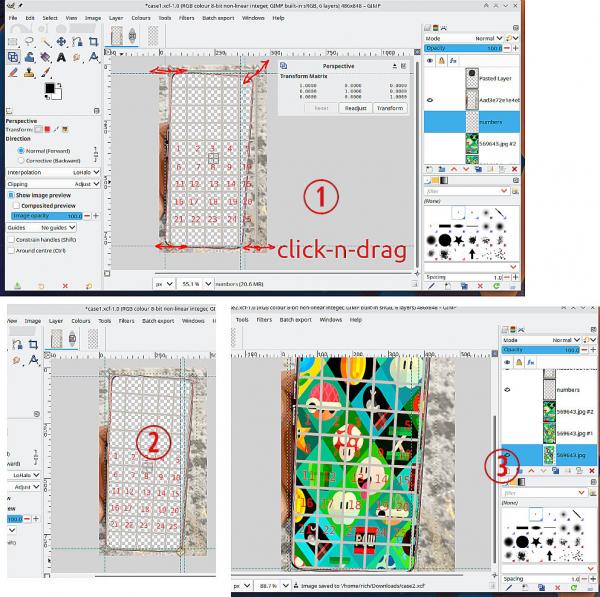
A 5x5 rectangular grid can fit somewhere in your template. For example purposes I made a grey grid and put some numbers in. I can apply the perspective tool and fit the grid in the phone area. (1) That gives the perspective (2) You can do the same with the other background images (3)
Quote .. like showing the top left corner zoomed in (1, 2, 6 and 7) or the center zoomed out (7, 8, 9, 12, 13, 14, 19, 20 21).
I do not understand that.
Your case.xcf image is in color indexed mode. Changing to Image -> Mode -> RGB will make editing easier.
A 5x5 rectangular grid can fit somewhere in your template. For example purposes I made a grey grid and put some numbers in. I can apply the perspective tool and fit the grid in the phone area. (1) That gives the perspective (2) You can do the same with the other background images (3)
Quote .. like showing the top left corner zoomed in (1, 2, 6 and 7) or the center zoomed out (7, 8, 9, 12, 13, 14, 19, 20 21).
I do not understand that.
Your case.xcf image is in color indexed mode. Changing to Image -> Mode -> RGB will make editing easier.