




A little sympathy for you (but not much) I have seen a lot of this recently, mostly new users who do not know how Gimp works and expect it to work like their "previous" editor. There are developer plans to "improve" the UI but do not expect that soon.
Gimp uses whatever fonts the OS system has installed. If you want Gimp to use less, then you need to thin the system fonts down. Not difficult in linux, I deactivated nearly 50%
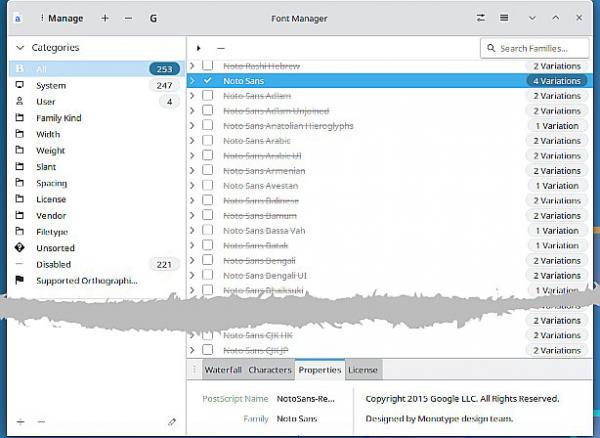
You will have to search for some method that works with MacOS: FontBook ??? maybe something like https://typefaceapp.com/help/tips/removing-noto-fonts.
Do not use the on-canvas tool, at least until you know what you are doing.
What is possible with Gimp 3:
The Font Tools dock
(1) Clicking in the [Aa] icon lists all the fonts and you can choose from there. Use the little search box at the bottom, first letter of the font name takes you there.
(2) Next to that is filter that takes the partial font name and that can thin the choice down.
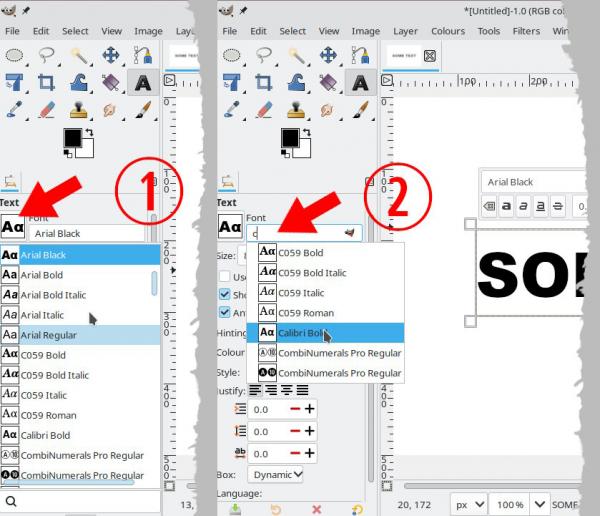
If you have the Fonts dock open: https://docs.gimp.org/3.0/en/gimp-font-dialog.html
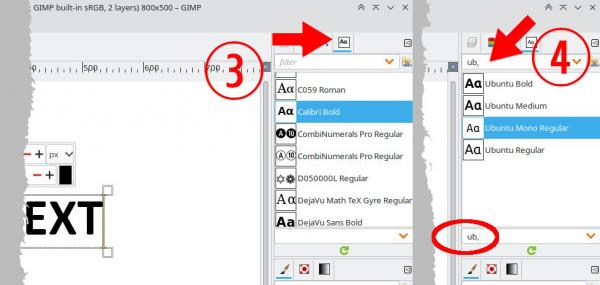
(3) Again you get the full fonts list, but it is useful for quickly running through the fonts to see how they look in your canvas.
(4) The filter is for tagged fonts, you do have to tag them one at a time, useful if you want to keep a set for a particular purpose. https://docs.gimp.org/3.0/en/gimp-tagging.html
Gimp uses whatever fonts the OS system has installed. If you want Gimp to use less, then you need to thin the system fonts down. Not difficult in linux, I deactivated nearly 50%
You will have to search for some method that works with MacOS: FontBook ??? maybe something like https://typefaceapp.com/help/tips/removing-noto-fonts.
Do not use the on-canvas tool, at least until you know what you are doing.
What is possible with Gimp 3:
The Font Tools dock
(1) Clicking in the [Aa] icon lists all the fonts and you can choose from there. Use the little search box at the bottom, first letter of the font name takes you there.
(2) Next to that is filter that takes the partial font name and that can thin the choice down.
If you have the Fonts dock open: https://docs.gimp.org/3.0/en/gimp-font-dialog.html
(3) Again you get the full fonts list, but it is useful for quickly running through the fonts to see how they look in your canvas.
(4) The filter is for tagged fonts, you do have to tag them one at a time, useful if you want to keep a set for a particular purpose. https://docs.gimp.org/3.0/en/gimp-tagging.html