




02-25-2026, 08:29 AM
(This post was last modified: 02-25-2026, 08:32 AM by rich2005.
Edit Reason: edit
)
Very difficult to say without knowing the operations used before smudge. It would be better if you posted a screenshot showing tool options and layers. Just a short checklist then for you to consider.
(1) Brush Opacity - should be 100%
(2) The brush, use a suitable brush. If the clipboard brush is set it might be empty.
(3)Turn off dynamics
(4) Flow, if flow is greater than zero smudge acts more like a paint tool
(5) If more than one layer, are you on the correct layer ?
(6) Long shot, any editing that creates a layer effect. Made no difference here but a good idea to merge all layer effects.
(7) Edit: One I missed, Check the layer mode. Set it to normal.
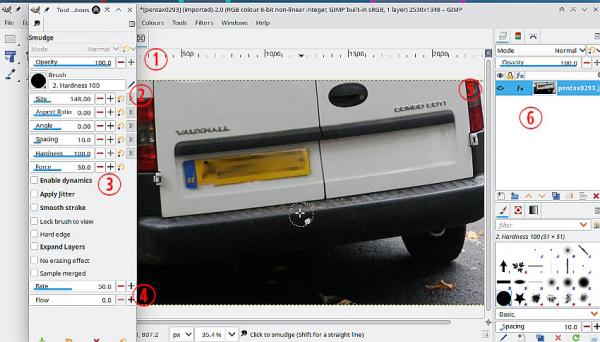
Gimp retains changed settings between sessions. Often a new user makes changes one day and forgets the next.
You can reset to defaults using Edit -> Preferences -> Tool Options then click Reset Saved Tool Options to Default Values then OK
(1) Brush Opacity - should be 100%
(2) The brush, use a suitable brush. If the clipboard brush is set it might be empty.
(3)Turn off dynamics
(4) Flow, if flow is greater than zero smudge acts more like a paint tool
(5) If more than one layer, are you on the correct layer ?
(6) Long shot, any editing that creates a layer effect. Made no difference here but a good idea to merge all layer effects.
(7) Edit: One I missed, Check the layer mode. Set it to normal.
Gimp retains changed settings between sessions. Often a new user makes changes one day and forgets the next.
You can reset to defaults using Edit -> Preferences -> Tool Options then click Reset Saved Tool Options to Default Values then OK