




first no need for bad language, at best I will edit.
In Edit -> Preferences you need to go one step further and expand the folders entry by clicking on the > icon
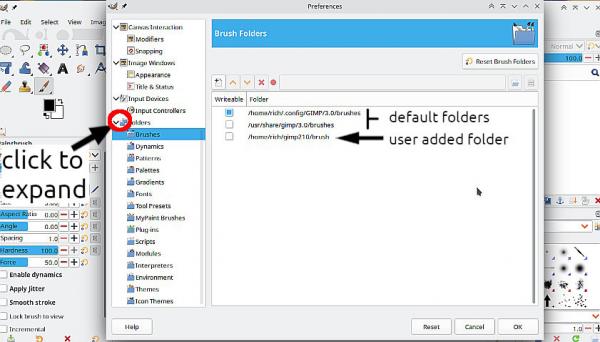
That shows where the default folder locations are: for Windows the path is.
C:\Users\"yourname"\AppData\Roaming\GIMP\3.0\
You can add extra paths to additional folders if you want. Not a bad idea for a simpler location.
A brushpack ? That sounds dubious. Gimp brushes are individual files "something.gbr" If you have a PS brush "something.abr" it can contain more than one brush. Gimp can use some .abr brushes, but not the most recent versions which might contain not reconised "actions"
Edit: ...quote...My user files don't even show...
If you are using Windows then the Appdata folder is a hidden folder. Some info here: https://support.captureone.com/hc/en-us/...on-Windows
In Edit -> Preferences you need to go one step further and expand the folders entry by clicking on the > icon
That shows where the default folder locations are: for Windows the path is.
C:\Users\"yourname"\AppData\Roaming\GIMP\3.0\
You can add extra paths to additional folders if you want. Not a bad idea for a simpler location.
A brushpack ? That sounds dubious. Gimp brushes are individual files "something.gbr" If you have a PS brush "something.abr" it can contain more than one brush. Gimp can use some .abr brushes, but not the most recent versions which might contain not reconised "actions"
Edit: ...quote...My user files don't even show...
If you are using Windows then the Appdata folder is a hidden folder. Some info here: https://support.captureone.com/hc/en-us/...on-Windows