




04-03-2026, 04:49 PM
I am not able to reproduce that problem. Selecting a font from tool options changes the font in the text box. Never a good idea to use the on-canvas tool except for a specific selection. Same with the old Editor window, that changed the font as well.
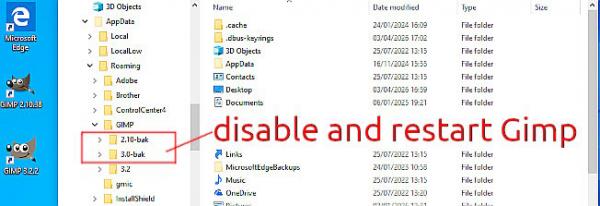
A long shot: Did you have a an older Gimp installation Gimp 2.10.x / Gimp 3.0.x ? Did Gimp 3.2.2 installation make a new User profile Gimp -> 3.2 ? Try making a new default profile. Disable any old profiles ( I renamed using -bak ) Start Gimp 3.2.2 to make a clean user profile. This a Win10 / Gimp 3.2.2
Most likely not that but a locale issue for Arabic text. Are you using an Arabic keyboard ? Is it rhe same problem with a latin QWERTY keyboard ?
-----
Not really the problem but the default font becomes "Monospace" I can change that from Edit -> Ptreferences
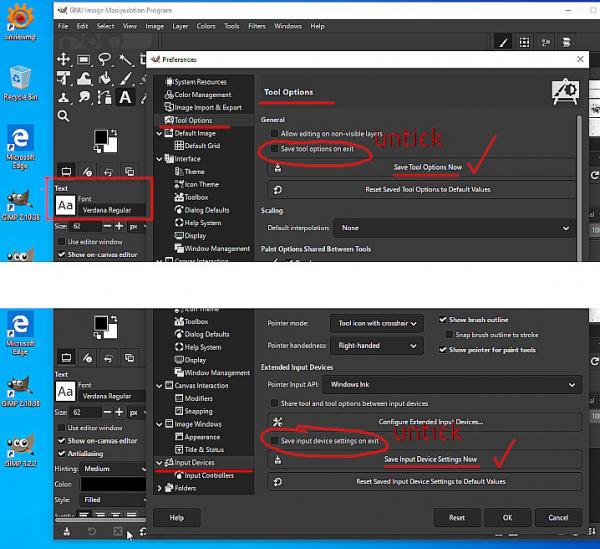
Set a font in the Font tool options. Then lock in Preferences. Two places.
A long shot: Did you have a an older Gimp installation Gimp 2.10.x / Gimp 3.0.x ? Did Gimp 3.2.2 installation make a new User profile Gimp -> 3.2 ? Try making a new default profile. Disable any old profiles ( I renamed using -bak ) Start Gimp 3.2.2 to make a clean user profile. This a Win10 / Gimp 3.2.2
Most likely not that but a locale issue for Arabic text. Are you using an Arabic keyboard ? Is it rhe same problem with a latin QWERTY keyboard ?
-----
Not really the problem but the default font becomes "Monospace" I can change that from Edit -> Ptreferences
Set a font in the Font tool options. Then lock in Preferences. Two places.