




Back to basics and what is available in Gimp 
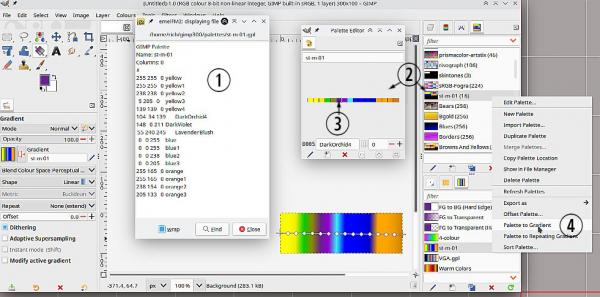
(1) The gimp palette format is very popular. It is a simple table of RGB values. You can add a text note after the RGB values if you want. I used a text editor and cut up your text but you can make a new palette using the palette editor and add colours one-at-a-time.
Looking at your post, it might be a palette file from some other editor. Gimp can import various formats see; https://docs.gimp.org/3.0/en/gimp-palette-dialog.html
(2) Clicking on a palette, brings up the palette editor
(3) Click on an entry in the palette editor to set the FG or BG color
(4) Making a gradient from a palette. Right click on the palette entry and select Palette to Gradient.
As an example that .gpl palette attached. You will have to unzip it.
(1) The gimp palette format is very popular. It is a simple table of RGB values. You can add a text note after the RGB values if you want. I used a text editor and cut up your text but you can make a new palette using the palette editor and add colours one-at-a-time.
Looking at your post, it might be a palette file from some other editor. Gimp can import various formats see; https://docs.gimp.org/3.0/en/gimp-palette-dialog.html
(2) Clicking on a palette, brings up the palette editor
(3) Click on an entry in the palette editor to set the FG or BG color
(4) Making a gradient from a palette. Right click on the palette entry and select Palette to Gradient.
As an example that .gpl palette attached. You will have to unzip it.