




I think the expression is - A bit late to the party. You do not say if your Win 7 is 64 bit or 32 bit 32 bit might account for some problems, however I keep a Gimp 2.10.38 , and because of all the useful scripts and plugins, it is still much in use.
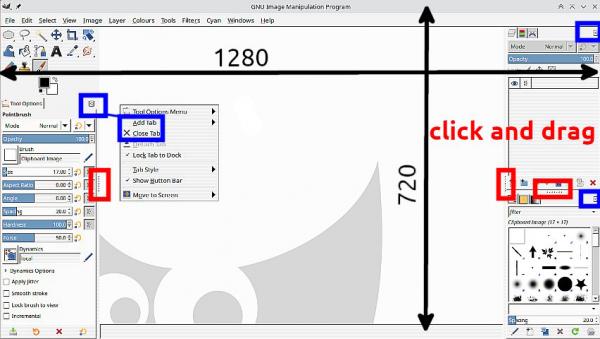
I am critical of the current Gimp packaging. The docks are OK but way too many tabs are included. My basic setup would fit in a smaller display, it is 1280 x 720 pix. For me the most important dock is layers, so that is top. All I need under the tools are the tool options. You can get there by closing and adding using that little left pointing arrow (blue highlight) and docks resize by click-and-drag those hot spots (red high light)
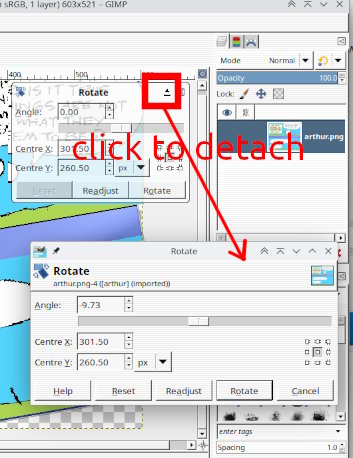
Rotate (and others) stuck ? There is a little icon that detaches it. Moves around as any floating window.
I am critical of the current Gimp packaging. The docks are OK but way too many tabs are included. My basic setup would fit in a smaller display, it is 1280 x 720 pix. For me the most important dock is layers, so that is top. All I need under the tools are the tool options. You can get there by closing and adding using that little left pointing arrow (blue highlight) and docks resize by click-and-drag those hot spots (red high light)
Rotate (and others) stuck ? There is a little icon that detaches it. Moves around as any floating window.