




A bit of a problem using Windows 11. M$ has broken the Gimp print preview. It is fixed with a registry hack. https://www.winhelponline.com/blog/resto...indows-11/ but if you do not want to do that then make your image in Gimp and print using some other application such as LibreOffice.
I do not have a printer installed in my Win11 VM so this is Win 10.
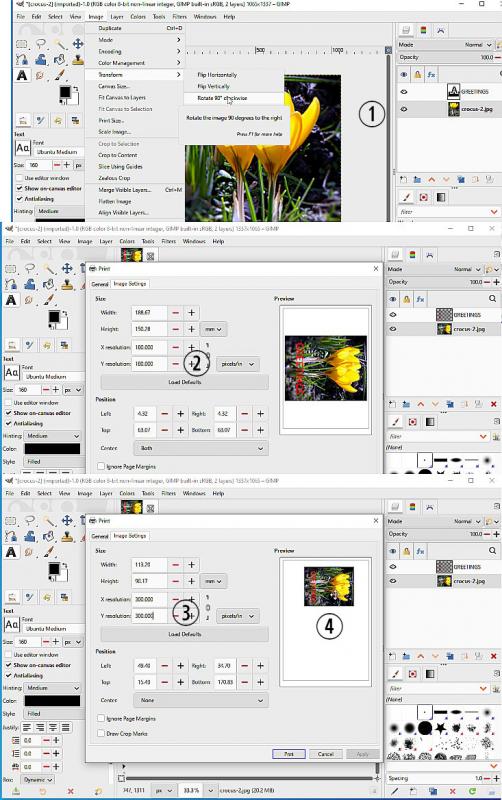
(1) When image is complete, Rotate 90 deg.
(2) In Image -> Print -> preview depending on how you created your image it might be too small / too large.
(3) Change print size by adjusting the resolution settings ( If originally very small, then go back and redraw your masterpiece at a larger size)
(4) Click and drag the preview to a suitable location - usually the left side which gets printed first.
Note: home printers do not use white ink. Anything white (or transparent) takes the color of the media.
A lot easier in linux and the gutenprint plugin, I did exactly this last Christmas, Use a bit of regular paper as a trial run. My printer which bends the card around a roller was not happy but I got there.
I do not have a printer installed in my Win11 VM so this is Win 10.
(1) When image is complete, Rotate 90 deg.
(2) In Image -> Print -> preview depending on how you created your image it might be too small / too large.
(3) Change print size by adjusting the resolution settings ( If originally very small, then go back and redraw your masterpiece at a larger size)
(4) Click and drag the preview to a suitable location - usually the left side which gets printed first.
Note: home printers do not use white ink. Anything white (or transparent) takes the color of the media.
A lot easier in linux and the gutenprint plugin, I did exactly this last Christmas, Use a bit of regular paper as a trial run. My printer which bends the card around a roller was not happy but I got there.