



Well, that's irritating. I selected "Relative to 'Picked Reference' and it worked. I guess the "default" changed between installations.
I thought I'd tried that before posting, but obviously not
Thank you!
(to make a legend)Actually, that didn't work.
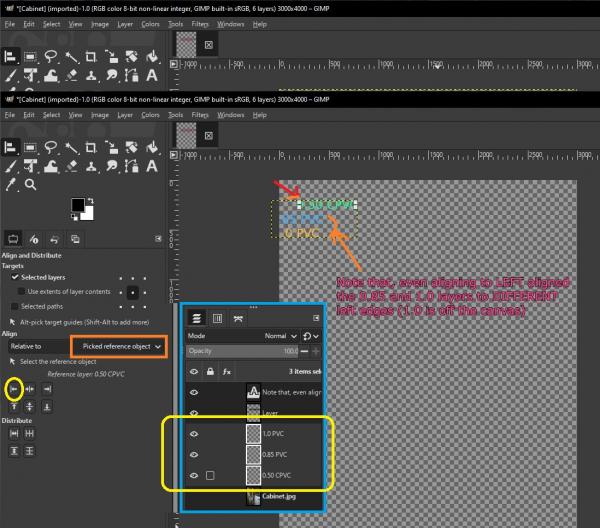
It DID allow me to select 1 of the PVC layers. It did NOT allow me to select more than one layer (align to layer A, etc) manually. I was able to select more than one layer in the layer list, but it only aligned 2 of the 3 (to the canvas) selected layers (NOT the selected (hoped to be the layer the others were aligned layer).
Even then, would ONLY align whichever layer I could select to the IMAGE, NOT to the 1st selected layer.
I should mention that I'm trying to align the 3 PVC layers (0.5, 0.85, and 1) to the 0.5 layer (to make a legend).
The previous (working) version had an option " align to Image, first selected, ... - 5 or 6 different settings. "Picked Reference object is meaningless, and even if you interpret it as the selected layer (the one with blocks at layer corners), it's IGNORING that layer for an alignment action (at least with my settings).
I thought I'd tried that before posting, but obviously not
Thank you!
(to make a legend)Actually, that didn't work.
It DID allow me to select 1 of the PVC layers. It did NOT allow me to select more than one layer (align to layer A, etc) manually. I was able to select more than one layer in the layer list, but it only aligned 2 of the 3 (to the canvas) selected layers (NOT the selected (hoped to be the layer the others were aligned layer).
Even then, would ONLY align whichever layer I could select to the IMAGE, NOT to the 1st selected layer.
I should mention that I'm trying to align the 3 PVC layers (0.5, 0.85, and 1) to the 0.5 layer (to make a legend).
The previous (working) version had an option " align to Image, first selected, ... - 5 or 6 different settings. "Picked Reference object is meaningless, and even if you interpret it as the selected layer (the one with blocks at layer corners), it's IGNORING that layer for an alignment action (at least with my settings).