




A bit tedious for Gimp 3 I recomment making key shortcuts for say remove alpha and zealous crop, but in pictures
The straighten function is incorporated into the measure tool . In auto mode use either a horiizontal or vertical edge and draw in a measure line. Put the mode into "Image" (the right side icon). Click on straighten which rotates the image but resizes the canvas to suit.
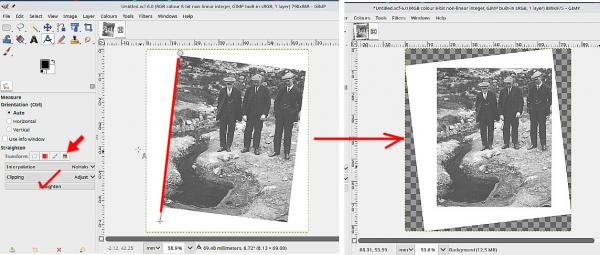
(Edit: If the scans are a bit dog-eared, then you might just want to go straight for another crop. )
Now you need to lose the transparency (layer menu) and remove excess with a zealous crop (image menu).
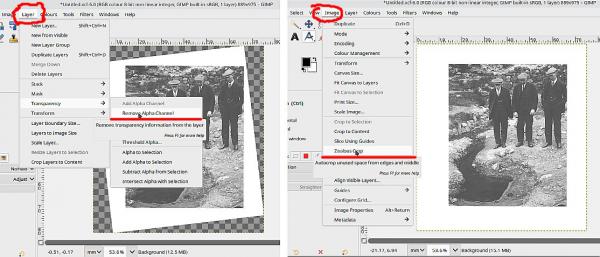
Gives this:
The straighten function is incorporated into the measure tool
. In auto mode use either a horiizontal or vertical edge and draw in a measure line. Put the mode into "Image" (the right side icon). Click on straighten which rotates the image but resizes the canvas to suit.(Edit: If the scans are a bit dog-eared, then you might just want to go straight for another crop. )
Now you need to lose the transparency (layer menu) and remove excess with a zealous crop (image menu).
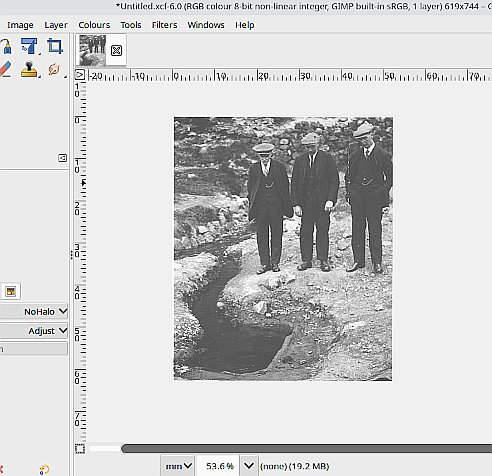
Gives this: