




@Terrenuit
As posted your image is RGB (which is ok) and not very black and white. There are a few ways to get a result, I will start off two ways.
Colors > Levels looks like this: Make sure (1) Merge filter is on (2) Click on the little (white point) icon (3) Click in the canvas to improve the background. Now add a new layer and fill with blue (4) Change the layer mode to Overlay. (5)
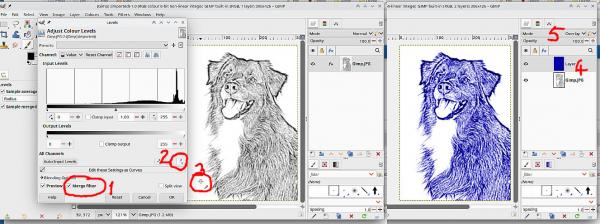
or
Bottom of the Colors menu is local-threshold. Again make sure Merge Filter is on. Move the slider until you get an effect you like.
Add a new layer, fill with blue, this time put the layer mode to Addition.
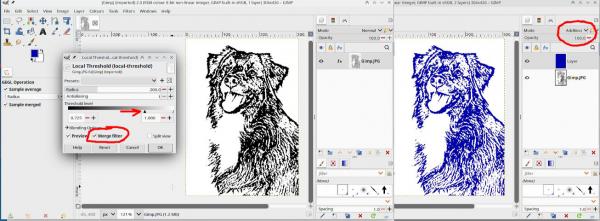
As posted your image is RGB (which is ok) and not very black and white. There are a few ways to get a result, I will start off two ways.
Colors > Levels looks like this: Make sure (1) Merge filter is on (2) Click on the little (white point) icon (3) Click in the canvas to improve the background. Now add a new layer and fill with blue (4) Change the layer mode to Overlay. (5)
or
Bottom of the Colors menu is local-threshold. Again make sure Merge Filter is on. Move the slider until you get an effect you like.
Add a new layer, fill with blue, this time put the layer mode to Addition.