




For Gimp 2.10 (themes format is different for Gimp 3.x)
Possibly the copy / paste breaks the file. Might be the rename "Custom Theme" - avoid spaces in file names use custom-theme. Check that it is actually in the user themes folder.
As a long time user, I have always used a two pane file manager (I can go back to DOS/XTGold) and really recommend installing one. The screenshots show Double Commander https://doublecmd.sourceforge.io/ but there are others, do a search. Double commander comes with its own text editor otherwise use NotePad++ https://notepad-plus-plus.org/
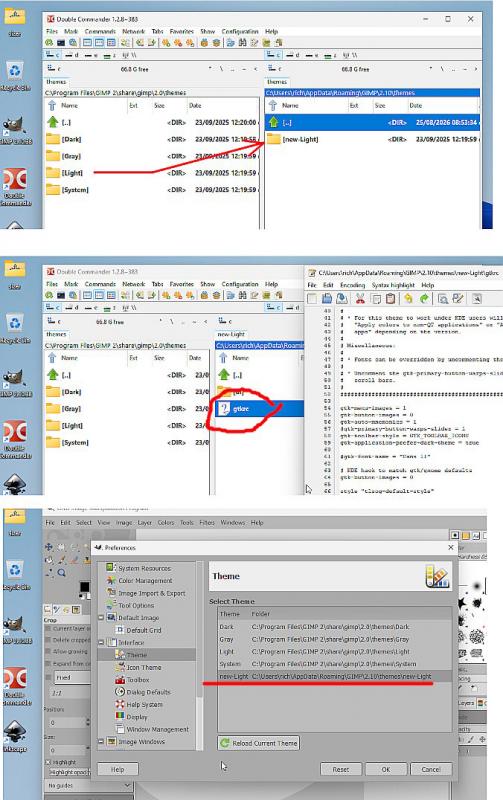
Top to bottom
Move the theme folder and rename
gtkrc open in text editor
The new theme does show in Edit -> Preferences.
Possibly the copy / paste breaks the file. Might be the rename "Custom Theme" - avoid spaces in file names use custom-theme. Check that it is actually in the user themes folder.
As a long time user, I have always used a two pane file manager (I can go back to DOS/XTGold) and really recommend installing one. The screenshots show Double Commander https://doublecmd.sourceforge.io/ but there are others, do a search. Double commander comes with its own text editor otherwise use NotePad++ https://notepad-plus-plus.org/
Top to bottom
Move the theme folder and rename
gtkrc open in text editor
The new theme does show in Edit -> Preferences.