




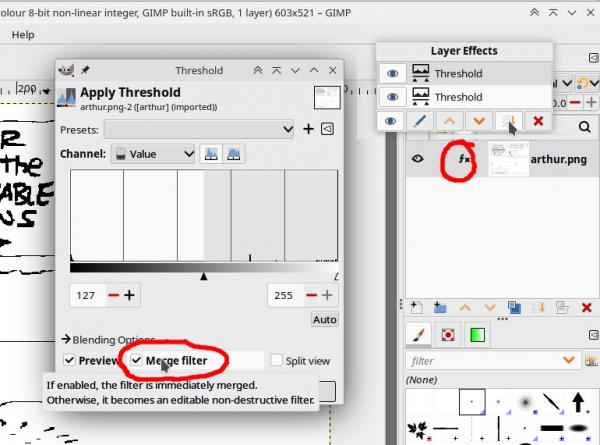
It is the Gimp 3.x layer effects (fx) which acts as a sort-of non-visible layer. Look for the fx icon in the layer dock.
see: https://docs.gimp.org/3.2/en/gimp-using-...fects.html
When you apply a filter (threshold / curves ...many others) look for a Merge filter icon and apply it.
or
Click on the fx icon which pops up options for merging / moving / editing.
see: https://docs.gimp.org/3.2/en/gimp-using-...fects.html
When you apply a filter (threshold / curves ...many others) look for a Merge filter icon and apply it.
or
Click on the fx icon which pops up options for merging / moving / editing.