




Keep looking in and maybe an expert will answer.
I looked at this https://afterness.com/digital/step_scale.html and just a posterized gradient.
However, taking this statement quote Is there a way to invert the GIMP measurement scale so the white is measured as 0% and the black as 100%?
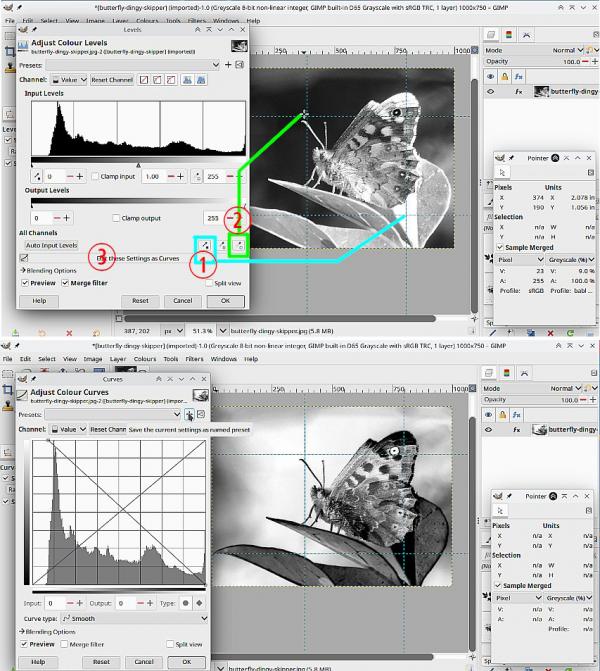
Using Colors -> Levels I can use the Black Point picker (1) to select white and the White Point picker (2) to select black
Then sent that to the Curves tool (3)
..............but how that applies to your step-scale I do not know.
I looked at this https://afterness.com/digital/step_scale.html and just a posterized gradient.
However, taking this statement quote Is there a way to invert the GIMP measurement scale so the white is measured as 0% and the black as 100%?
Using Colors -> Levels I can use the Black Point picker (1) to select white and the White Point picker (2) to select black
Then sent that to the Curves tool (3)
..............but how that applies to your step-scale I do not know.