

Thread Rating:
  • 0 Vote(s) - 0 Average
  • 1
  • 2
  • 3
  • 4
  • 5
Best way to recolor this image
#11
Ahhh.....no

You get a layer mask from Layers -> Mask -> Add Layer Mask https://docs.gimp.org/2.8/en/gimp-layer-mask-add.html

...and that acts on the layer it is attached to.

Various options to choose when adding a mask, the one that is applicable in this case is from a selection.

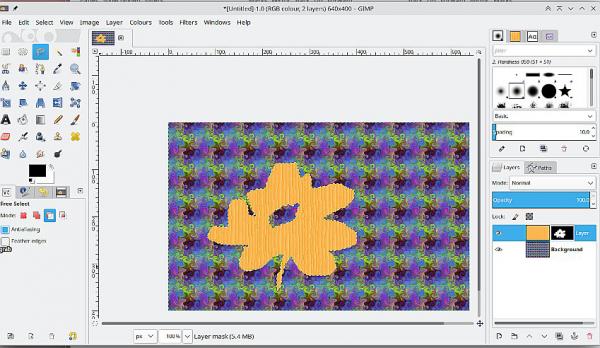
Edit: Fire up the old Gimp 2.8:  The layer mask acts as a window on the layer underneath. Black is transparent white is opaque. You can paint in the layer mask to modify it. Note the border indicates if the layer mask is active / not active.  Just takes a little practice.
   
Reply
#12
(01-31-2026, 08:30 AM)rich2005 Wrote: Ahhh.....no

You get a layer mask from Layers -> Mask -> Add Layer Mask https://docs.gimp.org/2.8/en/gimp-layer-mask-add.html

...and that acts on the layer it is attached to.
*sigh*


I thought that's what I did. At least, I clicked on "Add Layer Mask" from the Layers menu. Then, if I remember right, I desaturated the original to get a start on it. I guess I can't do that?

And there's no way to attach this layer I've called "Mask" to the layer it's supposed to be acting on?

Sad

*Starts slogging away at it all over again* Sick
Reply
#13
(01-31-2026, 10:42 PM)IndiePubber Wrote:
(01-31-2026, 08:30 AM)rich2005 Wrote: Ahhh.....no

You get a layer mask from Layers -> Mask -> Add Layer Mask https://docs.gimp.org/2.8/en/gimp-layer-mask-add.html

...and that acts on the layer it is attached to.
*sigh*


I thought that's what I did. At least, I clicked on "Add Layer Mask" from the Layers menu. Then, if I remember right, I desaturated the original to get a start on it. I guess I can't do that?

And there's no way to attach this layer I've called "Mask" to the layer it's supposed to be acting on?

Sad

*Starts slogging away at it all over again* Sick

The wrong way round.  
With the layer active, make your selection and for that building fascia it is .. using colour select  (or any other way)
Now go to Layer -> Mask -> Add Layer Mask  and choose Selection   The layer mask is greyscale, no need to desaturate anything.

Just experiment, one minute, make two layers, draw in a selection. Top layer active, add a layer mask. (see previous screenshot)
Reply


Forum Jump: