




You can try the "old" way using the color curves and dragging the value curve in a zig-zag.
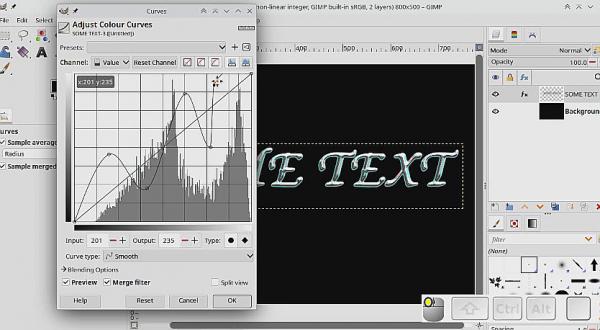
The GEGL bevel is not too bad but to apply effects using Gimp 3.2 looks like you have to rasterize it (lose the text property)
Start off with text in a light blue with a touch of grey colour.
Lose the text property.
Add a bevel
Apply the color curve (with merge effect on)
Use Colorize for some other colour.
one minute video https://sendvid.com/a5xyhix3
The GEGL bevel is not too bad but to apply effects using Gimp 3.2 looks like you have to rasterize it (lose the text property)
Start off with text in a light blue with a touch of grey colour.
Lose the text property.
Add a bevel
Apply the color curve (with merge effect on)
Use Colorize for some other colour.
one minute video https://sendvid.com/a5xyhix3