Posts: 4
Threads: 1
Joined: Apr 2026
Reputation:
0
Gimp version:
Operating system(s): Windows 10
Bonjour,
pour les 18 ans de ma fille, je souhaite lui faire un montage vidéos, style diaporama, avec des photos d'elle qui défilent mais je souhaite que les yeux soient au même endroit sur toutes les photos. J'avais commencé il y a longtemps avec ses premières photos en utilisant GIMP, mais je ne retrouve pas mon tutoriel.
De mémoire, je sélectionnais les yeux sur une des photos en dessinant le tour de l'iris, idem sur la seconde photo et il existait un outil qui, une fois sélectionné, alignait les deux photos.
J'aimerais retrouver ce tuto parce que je suis vraiment débutante et sans marche à suivre précise, je pense être perdue.
Je vous remercie.
Bonne journée 
Posts: 8,114
Threads: 174
Joined: Oct 2016
Reputation:
1,117
Gimp version:
Operating system(s): Linux
04-30-2026, 11:38 AM
(This post was last modified: 04-30-2026, 12:47 PM by rich2005.)
This is an English language forum. Please post in English, using a translation service.
Quote:Hello,
For my daughter’s 18th birthday, I’d like to make her a video montage, like a slideshow, with photos of her scrolling by, but I want her eyes to be in the same position in every photo. I started a long time ago with her first photos using GIMP, but I can’t find my tutorial.
From memory, I selected the eyes in one of the photos by tracing around the iris, did the same in the second photo, and there was a tool which, once selected, aligned the two photos.
I’d love to find that tutorial again because I’m a complete beginner and without precise step-by-step instructions, I think I’ll be lost.
Thank you.
Translated with DeepL.com (free version)
I do not know of an existing tutorial specifically for aligning eyes. Maybe some other Gimp user might know.
It all depends on your pictures, difficult to give advice about the unknowm
You are using Gimp 2.10 ? Then this plugin ofn-layer-aligner from
http://sourceforge.net/projects/gimp-too...s/scripts/ look for ofn-layer-aligner.zip date: 2016-07-12 Unzip and put in your user plugins folder.
Open the images as layers. The plugin uses a 4 point path, two points on each layer. This a 1 minute example: https://sendvid.com/mmc0jk9e
For those using Gimp3 the equivalent is here: https://sourceforge.net/projects/gimp3-t...s/general/ ofn3-align-layers.zip 2024-12-07
Posts: 4
Threads: 1
Joined: Apr 2026
Reputation:
0
Gimp version:
Operating system(s): Windows 10
Oui, c'était une manipulation dans ce genre-là! je vous remercie, je vais essayer cela. C'est pour faire un diaporama comm la pub Petit Bateau avec Izia Higelin que vous trouverez sur youtube si vous voulez mieux voir de quoi je parle. Merci en tous cas!
Posts: 4
Threads: 1
Joined: Apr 2026
Reputation:
0
Gimp version:
Operating system(s): Windows 10
(04-30-2026, 11:38 AM)riche2005 Wrote: Merci beaucoup, je suis vraiment débutante, pouvez-vous m'indiquer où trouver le dossier de plugins s'il vous plaît?
Merci et bonne soirée.
Quote:Bonjour,
pour les 18 ans de ma fille, j'aimerais lui faire un montage vidéo, un peu comme un diaporama, avec des photos d'elle qui défilent. Je voudrais que ses yeux soient toujours dans la même position. J'avais commencé il y a longtemps avec ses premières photos en utilisant GIMP, mais je ne retrouve plus le tutoriel.
De mémoire, j'avais sélectionné les yeux sur une photo en traçant le contour de l'iris, puis j'avais fait la même chose sur la deuxième. Il y avait ensuite un outil qui permettait d'aligner les deux photos. J'aimerais
beaucoup retrouver ce tutoriel car je suis complètement débutante et sans instructions précises, je crains d'être perdue.
Merci.
Je ne connais pas de tutoriel existant spécifiquement pour l'alignement des yeux. Peut-être qu'un autre utilisateur de GIMP en connaît un.
Tout dépend de vos images ; il est difficile de donner des conseils sur un sujet inconnu.
Vous utilisez GIMP 2.10 ? Dans ce cas, utilisez le plugin ofn-layer-aligner disponible sur
http://sourceforge.net/projects/gimp-too...s/scripts/ (cherchez ofn-layer-aligner.zip, date : 12/07/2016). Décompressez-le et placez-le dans votre dossier de plugins utilisateur.
Ouvrez les images en tant que calques. Le plugin utilise un tracé à 4 points, deux points par calque. Voici un exemple d'une minute : https://sendvid.com/mmc0jk9e.
Pour ceux qui utilisent GIMP 3, l'équivalent se trouve ici : https://sourceforge.net/projects/gimp3-t...s/general/ (ofn3-align-layers.zip, 07/12/2024).
Posts: 8,114
Threads: 174
Joined: Oct 2016
Reputation:
1,117
Gimp version:
Operating system(s): Linux
04-30-2026, 07:39 PM
(This post was last modified: 04-30-2026, 07:40 PM by rich2005.)
(04-30-2026, 07:06 PM)vmiarrg Wrote: Merci beaucoup, je suis vraiment débutante, pouvez-vous m'indiquer où trouver le dossier de plugins s'il vous plaît?
Merci et bonne soirée.
Please post in English.
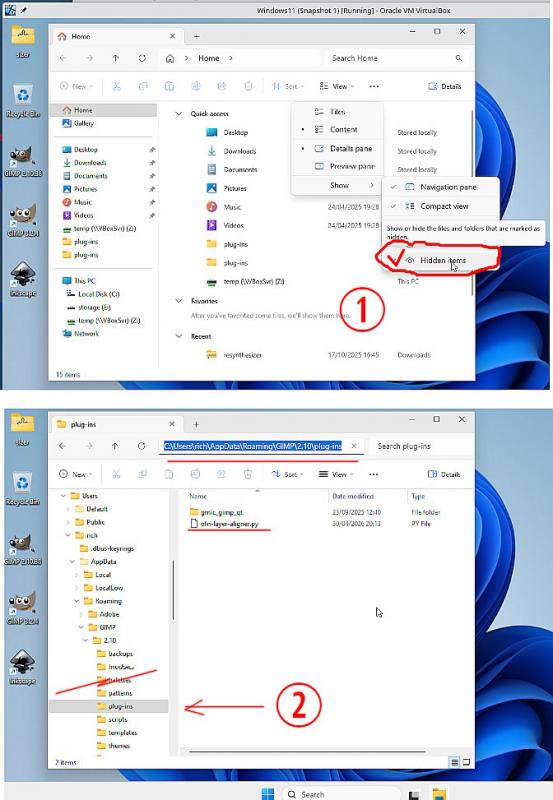
For Gimp 2.10 plugins go in C:\Users\"yourname"\AppData\Roaming\GIMP\2.10\plug-ins
Appdata is a hidden folder (1)
plugin folder (2)
Posts: 4
Threads: 1
Joined: Apr 2026
Reputation:
0
Gimp version:
Operating system(s): Windows 10
(04-30-2026, 07:39 PM)Thank you very much riche2005 ! I will try tomorrow. Good night! Wrote: (04-30-2026, 07:06 PM)vmiarrg Wrote: Merci beaucoup, je suis vraiment débutante, pouvez-vous m'indiquer où trouver le dossier de plugins s'il vous plaît ?
Merci et bonne soirée.
Veuillez poster en anglais.
Pour les plugins GIMP 2.10, rendez-vous dans C:\Utilisateurs\votre_nom\AppData\Roaming\GIMP\2.10\plugins.
AppData est un dossier caché (1),
le dossier des plugins (2).
|




