

Thread Rating:
  • 0 Vote(s) - 0 Average
  • 1
  • 2
  • 3
  • 4
  • 5
Transform Handles hard to see
#1
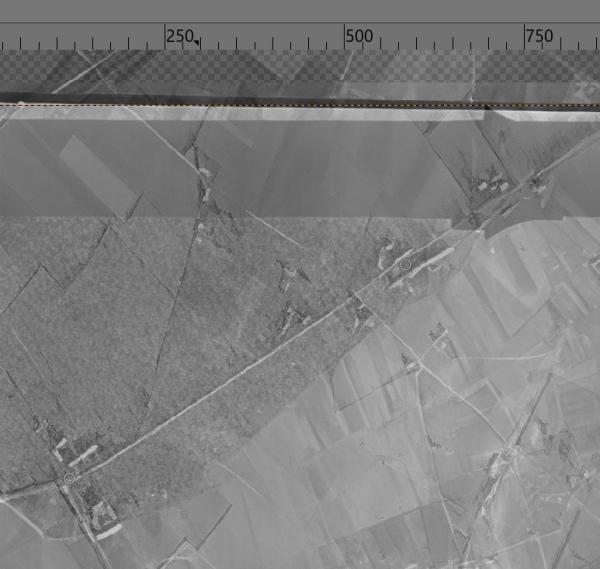
Is it possible to make the handles of 'Tools/Transformation Tool/Transformation Handle' in GIMP 3.2.4 more visible on a screen with a resolution of 3840 x 2160? They are difficult to see on such a screen. 
Two handles in screen below (do not zoom in, that image is what you see on a 3840x2160 screen): 
   
Reply
#2
(04-28-2026, 07:03 PM)denzjos Wrote: Is it possible to make the handles of 'Tools/Transformation Tool/Transformation Handle' in GIMP 3.2.4 more visible on a screen with a resolution of 3840 x 2160? They are difficult to see on such a screen. 
Two handles in screen below (do not zoom in, that image is what you see on a 3840x2160 screen): 

Agreed, difficult to see, especially on a greyscale image. They would be better if they showed as a coloured circle.

Something to try if they are lost Wink
In tool options composited preview then toggle layer visibility off.  


Calling all Gimp Developers .....
Reply
#3
(04-28-2026, 07:36 PM)rich2005 Wrote:
(04-28-2026, 07:03 PM)denzjos Wrote: Is it possible to make the handles of 'Tools/Transformation Tool/Transformation Handle' in GIMP 3.2.4 more visible on a screen with a resolution of 3840 x 2160? They are difficult to see on such a screen. 
Two handles in screen below (do not zoom in, that image is what you see on a 3840x2160 screen): 

Agreed, difficult to see, especially on a greyscale image. They would be better if they showed as a coloured circle.

Something to try if they are lost Wink
In tool options composited preview then toggle layer visibility off.  


Calling all Gimp Developers .....

I had already tried it, toggling.... Big Grin. Perhaps the use of higher-resolution screens should be taken into account somewhat more in the future.
Reply
#4
(04-29-2026, 08:16 AM)denzjos Wrote: ...snip.... I had already tried it, toggling.... Big Grin. Perhaps the use of higher-resolution screens should be taken into account somewhat more in the future.

Another way is a transparent layer on top, overlay the handles with a big painted dot. Select both layers and they move together.

When it comes to high-def displays, I recently got a new laptop and deliberately went for a regular 1920x1080 display.
Reply


Forum Jump: