

Thread Rating:
  • 0 Vote(s) - 0 Average
  • 1
  • 2
  • 3
  • 4
  • 5
choosing between different ways - which is the most appropiate here...
#1
hello and good day dear Community  Smile


well here i am back again - with some hmmm - lets say "beginner-question"... -


i need to colorize some dots in a file  (in a network visualization) using GIMP as the tool

well how to start: 


see the attached image:  would you do this with the  Bucket Fill approach or (alternatively) with the Colorize layer.

Wel to be frank with the second idea -( and method ) is not so familiar:  I honestly do not have so much experience with the work with layers. 
Guess that this method isolates specific nodes without altering the background or connecting... 

Which method would you suggest - for me - who is a bit unsecure in the work with layers... 
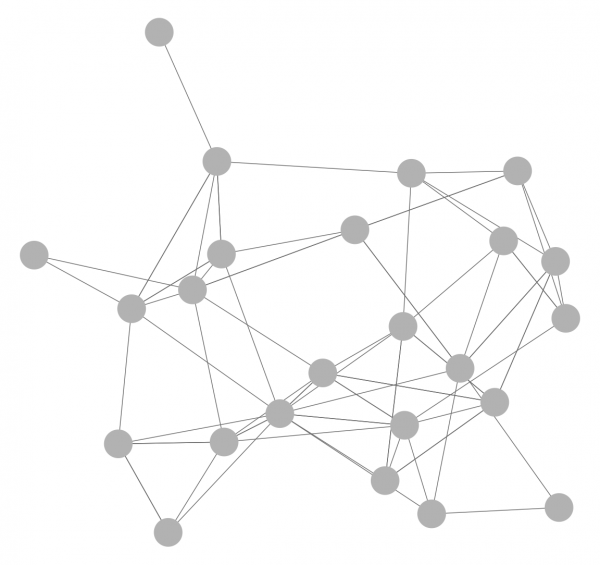


look forward to hear from you

regards  Smile
Reply
#2
(08-06-2026, 07:35 PM)saint_m Wrote: well here i am back again - with some hmmm - lets say "beginner-question"... -

i need to colorize some dots in a file  (in a network visualization) using GIMP as the tool

well how to start: 

see the attached image:  would you do this with the Bucket Fill approach[/b][/size] or (alternatively) with the Colorize layer.

Wel to be frank with the second idea -( and method ) is not so familiar:  I honestly do not have so much experience with the work with layers. 
Guess that this method isolates specific nodes without altering the background or connecting... 

Ok, for beginners:  Always, wherever possible use layers, in particular transparent layers where it is easier to correct mistakes, without affecting the base image.

Unselecting small elements such as the connecting lines.  An old Gimp trick.


(1) A colour select selects dots and connecting lines. (using the draw mask option for visibility)
(2) Shrinking the selection a small amount often eliminates the small elements.
(3) Growing the same small amount puts what remains back to original size.

That leaves just the dots selected. A Gimp selection is not confined to just one layer, so make that new layer.


(4) Paint in individual dots with the paint tool
(5) For a group of dots use the free select tool in Intersect mode. That closes selections outside the intersect boundary. Bucket fill the remaining selection.
-------
However, about time you got out of beginner mode and looked at ways of saving your work, Selections can be saved as channels. Alpha lock stops painting in transparency. Layer masks are non-destructive.  Aways Save as a Gimp xcf which keeps these properties.
Reply
#3
good day dear Rich2005


first of all - many thanks for the quick reply and for stepping up the plate - as allways - your ideas & thoughts and support is so valuable to me. It just hits the point.  I especially thank you so much for the encouragement - and for the suppport even -if i have come up wiht - lets say - some sort of similar  topics.I am really in the "learning-

mode" and i have to dive into all things GIMP 
now: thank you so much for sharing your ideas - and the knowledgei will digg deeper here - (since  i think i could make use of these steps, Ideas and procedures in other areas too.


Thank you dso much
greetings

i am a big big fan of this forum - i love this forum so much
Reply


Forum Jump: