Maybe, with many caveates:
This is using one of Ofnuts Gimp 2.10 python plugins ofn-tiles.py from
http://sourceforge.net/projects/gimp-too...s/scripts/
That then depends on your OS, Windows ok, some linux Gimp 2.10 versions do not come with python 2.7 support. MacOS - I do not know.
Are all the screenshots identical to the example you posted. For the sake of this example I am assuming they are. ofn-tiles.py is a bit picky about sizes, the width in pixels has to be divisible by four.
Thus, in BIMP it might go like this:
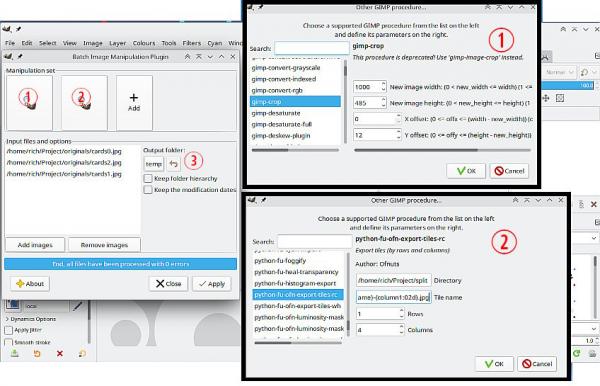
(1) Crop to trim off the un-needed edges. Use the "other Gimp procedure" not the BIMP version.
(2) The ofn-tiles.py comes with two entries, using the rows columns entry
Set the output folder, probably best to copy/paste from your file manager or carefully enter the path. ie I am using this
/home/rich/Project/split/
Set the output file name template. You can change the output format. png is default for jpeg something like this: {imageName}-{column1:02d}.jpg Set 1 row , 4 columns.
(3) BIMP need a destination to dump the original (cropped) images.
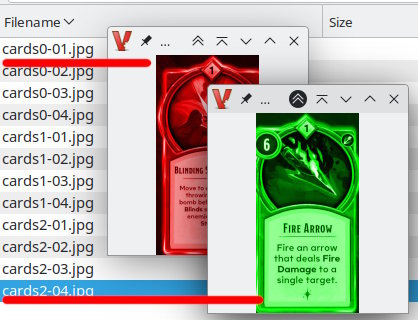
As a test to check working, your posted image as coloured duplicates, outputs like this:








 ...thus... using an old script (attached - goes in your user scripts folder)