| Welcome, Guest |
You have to register before you can post on our site.
|
| Forum Statistics |
» Members: 5,302
» Latest member: vebe67
» Forum threads: 7,905
» Forum posts: 42,889
Full Statistics
|
| Latest Threads |
GIMP 3.2.x
Forum: General questions
Last Post: MrsP-from-C
1 hour ago
» Replies: 4
» Views: 190
|
question about "Batch Ima...
Forum: General questions
Last Post: vebe67
Yesterday, 06:32 AM
» Replies: 2
» Views: 197
|
chemin - path
Forum: General questions
Last Post: ApacheBlue
05-22-2026, 02:13 PM
» Replies: 7
» Views: 547
|
All projects are LOCKED
Forum: General questions
Last Post: sallyanne
05-22-2026, 10:41 AM
» Replies: 1
» Views: 137
|
Setting a default directo...
Forum: Tutorials and tips
Last Post: merlilderman
05-21-2026, 02:57 PM
» Replies: 1
» Views: 2,194
|
Switch tools from Text to...
Forum: General questions
Last Post: Ulodesk
05-18-2026, 10:05 PM
» Replies: 2
» Views: 392
|
Changing the size of the ...
Forum: General questions
Last Post: Ulodesk
05-17-2026, 01:39 PM
» Replies: 3
» Views: 416
|
Gimp3 ubuntu 24.04 favour...
Forum: Extending the GIMP
Last Post: vitforlinux
05-16-2026, 03:02 PM
» Replies: 1
» Views: 624
|
Dial Marks
Forum: Extending the GIMP
Last Post: MrsP-from-C
05-15-2026, 04:29 PM
» Replies: 1
» Views: 305
|
DDS Export error
Forum: General questions
Last Post: schabrackes
05-15-2026, 06:53 AM
» Replies: 2
» Views: 466
|
|
|
| Path animation |
|
Posted by: Ofnuts - 06-30-2019, 10:28 PM - Forum: Gallery
- Replies (3)
|
 |
(click for animation)
Of course there is a script behind this. Been quite a fight, between the bugs and getting Gimp to process strokes in left-to-right order.
|

|
|
| Editing features overlap between Rawtherapee and GIMP |
|
Posted by: DearDeparted - 06-30-2019, 12:46 AM - Forum: General questions
- Replies (6)
|
 |
Installed Rawtherapee recently for editing raw nikon files. It can do a lot of things available in GIMP.
Instead of using Rawtherapee first and then GIMP on editing an image, prefer to just stick to GIMP.
If GIMP has editing work scope of 8 (0-10), where is Rawtherapee?
Hope one day, one can import raw file directly into GIMP.
Thanks.
|
|
|
|
| How can I add text on a GIF |
|
Posted by: Audrey Hossain - 06-28-2019, 03:50 PM - Forum: General questions
- Replies (1)
|
|
As the title says, I wanna add text on a GIF. As for the position, I want to both add text on the GIF itself, and also on top of the GIF (in a white background). But I'm confused as to how to do it. Any help will be appreciated.
|
|
|
|
| Feathering won't turn off |
|
Posted by: Ferdrimmler - 06-27-2019, 01:20 AM - Forum: General questions
- Replies (4)
|
|
I posted a problem in the 2.8 forum here:
https://www.gimp-forum.net/Thread-Feathe...t-turn-off
Then I uninstalled 2.8 and installed 2.10.16.
The same bug exists in GIMP 2.10: I can't add or subtract regions from a selection without a cut doing feathering, regardless of whether I have feathering turned on or off. It's worse in GIMP 2.10; the effect is even more clearly visible.
But I have done this exact operation for years, and it only stopped working yesterday!
Can someone please look at the images in the 2.8 thread, and help figure out why even a fresh install of GIMP, working on a brand new image, won't let me add or subtract selections to the current selection anymore? I can't use GIMP anymore unless I can fix this!
I'm running Windows 7 64-bit.
|
|
|
|
 Different Value Between Sample Points Vs Color Picker
 |
|
Posted by: Krikor - 06-26-2019, 07:40 PM - Forum: General questions
- Replies (4)
|
 |
The different value between Sample Points Vs Color Picker.
Hello, I'm not sure how to explain, but I think the image illustrious enough about my doubt.
I use the Color Picker (CP) to find a point (X,Y) of the image with a certain amount of tone desired. So I create at the same point (X,Y) a Sample Points (SP).
As the point is the same, the image is the same, the Value should be the same in the Sample Point window and in the Color Picker window, and usually has been, but ...
In the creation of points 01 and 02 indicated in the image, there was fidelity between the values of Value displayed by SP and CP, but when defining point 03, there was a discrepancy.
According to the image below, for the same position X = 576 and Y = 676 the Value at the sample point is 42%, while in the Color Picker it is 37.6%
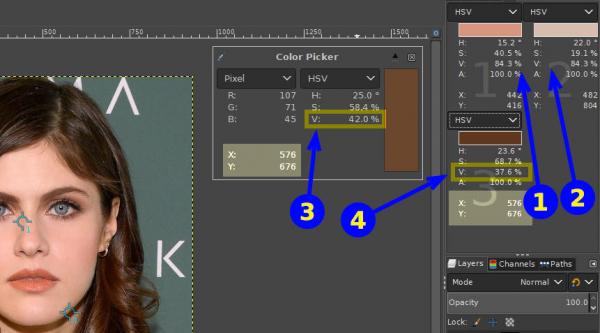
Maybe I'm doing something wrong, but what?
Why different values?
Thx.
|
|
|
|
|


![[Image: nDLSdiCvZMnQPuwtNws-dy8LQcZBxLXrtpSXYCoj...dnWyp3rqC5]](https://lh5.googleusercontent.com/nDLSdiCvZMnQPuwtNws-dy8LQcZBxLXrtpSXYCojcIwaQbf8W1Aht-EVSRDeNbXH2QOuzVbVEYmeMQg84JAu1dSyG0HyNBRCYFWj0QgxcDkFt_Cf7ORHOABN1l5a66dnWyp3rqC5)
![[Image: cbSqTWa10_h2y5OwNtA9qGgc8tvvYpCfnuiV0Sf2...sScjp9_Xc4]](https://lh3.googleusercontent.com/cbSqTWa10_h2y5OwNtA9qGgc8tvvYpCfnuiV0Sf25vcz51rWV9pUEB0qRyK9dyri4WEB-Ms0bYv9U5vDyO7Pr1Wve5puTbPtXobYg48P3ySDcqQugU6cbRdzZS5rzCsScjp9_Xc4)
![[Image: JXk7kLz-pxD_WlYlBr26ek6UlVE3MTN18S8COc2E...0G7Tu-4hum]](https://lh5.googleusercontent.com/JXk7kLz-pxD_WlYlBr26ek6UlVE3MTN18S8COc2Eo9Qek7CfVJEm9TySDfuSgCmOGH5qhqsXJBebM_briTdKfuvfP307BfSWpRR198fMIXrwwdeQV3Z8DlUWtxZ-KJ0G7Tu-4hum)
![[Image: ENysZyU7aWhHSLKYMu_3HJAg9KhdEVsCXK-I1nk6...RtdNYfKtsG]](https://lh5.googleusercontent.com/ENysZyU7aWhHSLKYMu_3HJAg9KhdEVsCXK-I1nk6jZPL9p3hcWN_phMzj3wE81CN2AWVVtZaX83JCGrOZuRECoQLRRmRYbIAXC7BeVbZ1K6Fw1lsrw9BhrdnYSbzuwRtdNYfKtsG)
![[Image: 0igCdYU7Eq6BsmovxwdUcyExK42TGKpMXpZ96EFU...GCi-eK8JGa]](https://lh3.googleusercontent.com/0igCdYU7Eq6BsmovxwdUcyExK42TGKpMXpZ96EFUHDK0HeH1-5cK7IiNPtllRhOv6zojVMNP0YkEuflbOBmm5HQT0kMbaKV9JcHkpEfUSYVZ6d6VM5LjhHwfC2jHA5GCi-eK8JGa)

 .
.