| Welcome, Guest |
You have to register before you can post on our site.
|
| Latest Threads |
opening the image leads t...
Forum: General questions
Last Post: sallyanne
4 hours ago
» Replies: 1
» Views: 45
|
Requesting testers for CM...
Forum: General questions
Last Post: Malsasa
Yesterday, 03:31 PM
» Replies: 13
» Views: 1,989
|
For the civil (and milita...
Forum: Watercooler
Last Post: Tas_mania
Yesterday, 10:55 AM
» Replies: 9
» Views: 6,313
|
It is nice that GIMP exis...
Forum: Watercooler
Last Post: denzjos
Yesterday, 06:04 AM
» Replies: 0
» Views: 72
|
XP-Pen tablet works in Pa...
Forum: General questions
Last Post: rich2005
06-20-2026, 08:36 PM
» Replies: 1
» Views: 111
|
CMYK conversion
Forum: Other graphics software
Last Post: denzjos
06-20-2026, 06:38 AM
» Replies: 0
» Views: 109
|
Need help installing Resy...
Forum: Gimp 2.99 & Gimp 3.0
Last Post: Dave Rove
06-18-2026, 08:44 AM
» Replies: 8
» Views: 7,474
|
Color management and soft...
Forum: Gimp 2.99 & Gimp 3.0
Last Post: Malsasa
06-17-2026, 03:14 PM
» Replies: 5
» Views: 9,896
|
How to restore tool docks...
Forum: General questions
Last Post: rich2005
06-16-2026, 06:40 PM
» Replies: 3
» Views: 707
|
How to change mouse wheel...
Forum: General questions
Last Post: rich2005
06-16-2026, 07:27 AM
» Replies: 9
» Views: 19,142
|
|
|
 Try to transform a python script to go/back/and forth between Darktable and GIMP
 |
|
Posted by: PixLab - 01-31-2024, 05:31 AM - Forum: Scripting questions
- Replies (2)
|
 |
The original script is for LightZone and GIMP, which works nicely, from GIMP to LZ and back to GIMP
So my changes works nicely from GIMP to Darktable, but to get back from Darktable to GIMP again, I got an error
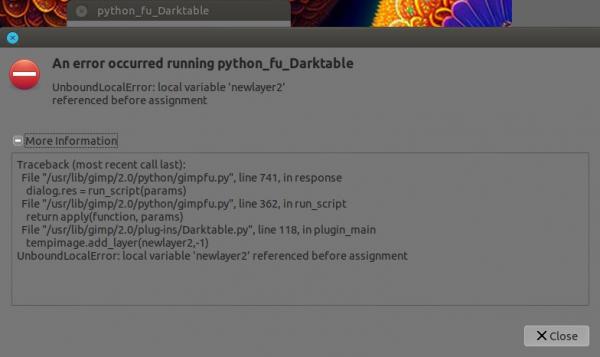
Any idea, help? I can't think anymore my head gets narrow vision now and is on fire 
the code I did some change for Darktable:
Code:
#!/usr/bin/env python


'''

Lightzone.py

call LightZone passing the active layer as a temp file.


Author:

Rob Antonishen

Modified by

Partha Bagchi

Modified by Martin Pohl

Modified by

Stefano Azzi

Modified by

Masahiro Kitagawa


Version:

0.8c Made it compatible with Windows, macOS, and Linux

0.8b Made it specific for LightZone

0.8 Made it specific to Nik Collection

0.7 fixed file save bug where all files were png regardless of extension

0.6 modified to allow for a returned layer that is a different size

    than the saved layer for

0.5 file extension parameter in program list.

0.4 modified to support many optional programs.


this script is modelled after the mm extern LabCurves trace plugin

by Michael Munzert http://www.mm-log.com/lab-curves-gimp


and thanks to the folds at gimp-chat has grown a bit ;)


License:


This program is free software; you can redistribute it and/or modify

it under the terms of the GNU General Public License as published by

the Free Software Foundation; version 3 of the License.


This program is distributed in the hope that it will be useful,

but WITHOUT ANY WARRANTY; without even the implied warranty of

MERCHANTABILITY or FITNESS FOR A PARTICULAR PURPOSE.  See the

GNU General Public License for more details.


The GNU Public License is available at

http://www.gnu.org/copyleft/gpl.html


'''


from gimpfu import *

import shlex

import subprocess

import os, sys

import tempfile

from shutil import copyfile


def gimp_log( text ):

    pdb.gimp_message( text )


def plugin_main( image, drawable, visible ):

  pdb.gimp_image_undo_group_start(image)


  # Copy so the save operations doesn't affect the original

  if visible == 0:

    # Save in temporary.  Note: empty user entered file name

    temp = pdb.gimp_image_get_active_drawable(image)

  else:

    # Get the current visible

    temp = pdb.gimp_layer_new_from_visible(image, image, "Darktable")

    image.add_layer(temp, 0)


  buffer = pdb.gimp_edit_named_copy(temp, "ShellOutDTTemp")


  #save selection if one exists

  hassel = pdb.gimp_selection_is_empty(image) == 0

  if hassel:

    savedsel = pdb.gimp_selection_save(image)


  tempimage = pdb.gimp_edit_named_paste_as_new(buffer)

  pdb.gimp_buffer_delete(buffer)

  if not tempimage:

    raise RuntimeError

  pdb.gimp_image_undo_disable(tempimage)


  tempdrawable = pdb.gimp_image_get_active_layer(tempimage)


  tempfilename = os.path.join(tempfile.gettempdir(), "ShellOutDTTempFile.tif" )


  # !!! Note no run-mode first parameter, and user entered filename is empty string

  pdb.gimp_progress_set_text ("Saving a copy")

  pdb.gimp_file_save(tempimage, tempdrawable, tempfilename, tempfilename)


  # Build command line call

  if sys.platform.startswith('win'):

    progtorun = "\"" + os.environ["ProgramW6432"] + "\\darktable\\darktable.exe\""

  elif sys.platform.startswith('darwin'):

    progtorun = "open -W -a \"darktable.app\""

  elif sys.platform.startswith('linux'):

    progtorun = "\"darktable\""

  command = progtorun + " \"" + tempfilename + "\""

  args = shlex.split(command)


  # Invoke external command

  pdb.gimp_progress_set_text ("calling Darktable...")

  pdb.gimp_progress_pulse()

  child = subprocess.Popen(args, shell=False)

  child.communicate()


  # put it as a new layer in the opened image

  try:

    darktablefile = os.path.join(tempfile.gettempdir(), "ShellOutDTTempFile.tif")

    copyfile( darktablefile, tempfilename )

    newlayer2 = pdb.gimp_file_load_layer(tempimage, tempfilename)

  except:

    RuntimeError


  tempimage.add_layer(newlayer2,-1)

  buffer = pdb.gimp_edit_named_copy(newlayer2, "ShellOutDTTemp")


  if visible == 0:

    drawable.resize(newlayer2.width,newlayer2.height,0,0)

    sel = pdb.gimp_edit_named_paste(drawable, buffer, 1)

    drawable.translate((tempdrawable.width-newlayer2.width)/2,(tempdrawable.height-newlayer2.height)/2)

  else:

    temp.resize(newlayer2.width,newlayer2.height,0,0)

    sel = pdb.gimp_edit_named_paste(temp, buffer, 1)

    temp.translate((tempdrawable.width-newlayer2.width)/2,(tempdrawable.height-newlayer2.height)/2)


  pdb.gimp_buffer_delete(buffer)

  pdb.gimp_edit_clear(temp)

  pdb.gimp_floating_sel_anchor(sel)


  #load up old selection

  if hassel:

    pdb.gimp_selection_load(savedsel)

    image.remove_channel(savedsel)


  # cleanup

  os.remove(tempfilename)  # delete the temporary file

  gimp.delete(tempimage)   # delete the temporary image

  os.remove( darktablefile )     # delete the locally created LZ file

  # Note the new image is dirty in Gimp and the user will be asked to save before closing.

  pdb.gimp_image_undo_group_end(image)

  gimp.displays_flush()


register(

        "python_fu_Darktable",

        "Call Darktable",

        "Call Darktable",

        "Rob Antonishen",

        "Copyright 2011 Rob Antonishen",

        "2011",

        "<Image>/Filters/Photo Editors/Darktable",

        "RGB*, GRAY*",

        [ (PF_RADIO, "visible", "Layer:", 1, (("new from visible", 1),("current layer",0))),

        ],

        [],

        plugin_main,

        )


main()
Original code of Lightzone.py
Code:
#!/usr/bin/env python


'''

Lightzone.py

call LightZone passing the active layer as a temp file.


Author:

Rob Antonishen

Modified by

Partha Bagchi

Modified by Martin Pohl

Modified by

Stefano Azzi

Modified by

Masahiro Kitagawa


Version:

0.8c Made it compatible with Windows, macOS, and Linux

0.8b Made it specific for LightZone

0.8 Made it specific to Nik Collection

0.7 fixed file save bug where all files were png regardless of extension

0.6 modified to allow for a returned layer that is a different size

    than the saved layer for

0.5 file extension parameter in program list.

0.4 modified to support many optional programs.


this script is modelled after the mm extern LabCurves trace plugin

by Michael Munzert http://www.mm-log.com/lab-curves-gimp


and thanks to the folds at gimp-chat has grown a bit ;)


License:


This program is free software; you can redistribute it and/or modify

it under the terms of the GNU General Public License as published by

the Free Software Foundation; version 3 of the License.


This program is distributed in the hope that it will be useful,

but WITHOUT ANY WARRANTY; without even the implied warranty of

MERCHANTABILITY or FITNESS FOR A PARTICULAR PURPOSE.  See the

GNU General Public License for more details.


The GNU Public License is available at

http://www.gnu.org/copyleft/gpl.html


'''


from gimpfu import *

import shlex

import subprocess

import os, sys

import tempfile

from shutil import copyfile


def gimp_log( text ):

    pdb.gimp_message( text )


def plugin_main( image, drawable, visible ):

  pdb.gimp_image_undo_group_start(image)


  # Copy so the save operations doesn't affect the original

  if visible == 0:

    # Save in temporary.  Note: empty user entered file name

    temp = pdb.gimp_image_get_active_drawable(image)

  else:

    # Get the current visible

    temp = pdb.gimp_layer_new_from_visible(image, image, "LightZone")

    image.add_layer(temp, 0)


  buffer = pdb.gimp_edit_named_copy(temp, "ShellOutTemp")


  #save selection if one exists

  hassel = pdb.gimp_selection_is_empty(image) == 0

  if hassel:

    savedsel = pdb.gimp_selection_save(image)


  tempimage = pdb.gimp_edit_named_paste_as_new(buffer)

  pdb.gimp_buffer_delete(buffer)

  if not tempimage:

    raise RuntimeError

  pdb.gimp_image_undo_disable(tempimage)


  tempdrawable = pdb.gimp_image_get_active_layer(tempimage)


  tempfilename = os.path.join(tempfile.gettempdir(), "ShellOutTempFile.tif" )


  # !!! Note no run-mode first parameter, and user entered filename is empty string

  pdb.gimp_progress_set_text ("Saving a copy")

  pdb.gimp_file_save(tempimage, tempdrawable, tempfilename, tempfilename)


  # Build command line call

  if sys.platform.startswith('win'):

    progtorun = "\"" + os.environ["ProgramW6432"] + "\\LightZone\\LightZone.exe\""

  elif sys.platform.startswith('darwin'):

    progtorun = "open -W -a \"LightZone.app\""

  elif sys.platform.startswith('linux'):

    progtorun = "\"lightzone\""

  command = progtorun + " \"" + tempfilename + "\""

  args = shlex.split(command)


  # Invoke external command

  pdb.gimp_progress_set_text ("calling LightZone...")

  pdb.gimp_progress_pulse()

  child = subprocess.Popen(args, shell=False)

  child.communicate()


  # put it as a new layer in the opened image

  try:

    lightzonefile = os.path.join(tempfile.gettempdir(), "ShellOutTempFile_lzn.jpg")

    copyfile( lightzonefile, tempfilename )

    newlayer2 = pdb.gimp_file_load_layer(tempimage, tempfilename)

  except:

    RuntimeError


  tempimage.add_layer(newlayer2,-1)

  buffer = pdb.gimp_edit_named_copy(newlayer2, "ShellOutTemp")


  if visible == 0:

    drawable.resize(newlayer2.width,newlayer2.height,0,0)

    sel = pdb.gimp_edit_named_paste(drawable, buffer, 1)

    drawable.translate((tempdrawable.width-newlayer2.width)/2,(tempdrawable.height-newlayer2.height)/2)

  else:

    temp.resize(newlayer2.width,newlayer2.height,0,0)

    sel = pdb.gimp_edit_named_paste(temp, buffer, 1)

    temp.translate((tempdrawable.width-newlayer2.width)/2,(tempdrawable.height-newlayer2.height)/2)


  pdb.gimp_buffer_delete(buffer)

  pdb.gimp_edit_clear(temp)

  pdb.gimp_floating_sel_anchor(sel)


  #load up old selection

  if hassel:

    pdb.gimp_selection_load(savedsel)

    image.remove_channel(savedsel)


  # cleanup

  os.remove(tempfilename)  # delete the temporary file

  gimp.delete(tempimage)   # delete the temporary image

  os.remove( lightzonefile )     # delete the locally created LZ file

  # Note the new image is dirty in Gimp and the user will be asked to save before closing.

  pdb.gimp_image_undo_group_end(image)

  gimp.displays_flush()


register(

        "python_fu_Lightzone",

        "Call LightZone",

        "Call LightZone",

        "Rob Antonishen",

        "Copyright 2011 Rob Antonishen",

        "2011",

        "<Image>/Filters/Photo Editors/LightZone",

        "RGB*, GRAY*",

        [ (PF_RADIO, "visible", "Layer:", 1, (("new from visible", 1),("current layer",0))),

        ],

        [],

        plugin_main,

        )


main()
|

|
|
| Left menu pane vanished |
|
Posted by: SpanishRed - 01-29-2024, 02:05 AM - Forum: General questions
- Replies (2)
|
 |
The lefthand menu pane of my software vanished while I was busy working with GIMP, so clearly I pushed something I should not have pushed. I've tried:
- Pushing tab
- Cnt B
- Looking for an option in the "View" menu
- Looking for an option in the "windows" menu.
Nothing works. Then I tried uninstalling and reinstalling the software, but it won't uninstall. I've tried uninstalling from the apps and features menu as well as from the start menu.
|
|
|
|
| All my color blendings are tending towards brighter values in all images |
|
Posted by: Ellye - 01-27-2024, 05:03 AM - Forum: General questions
- Replies (4)
|
|
Suppose I have a pure black (#000000) layer and a pure white (#FFFFFF) layer.
They are one on top of the other, both with normal blending. The one above is 50% opacity.
I'd expect that the resulting color would be a midpoint gray (#7F7F7F). And I'm pretty sure that's what I used to get on GIMP until recently, and it's still what I get on other softwares.
Instead, I'm getting #BCBCBC - a far brighter color.
This is not just about layer blending either - any brush with some kind of transparency or anything like that - the result of mixing colors always come up brighter than I'd expect.
I tried both "Perceptual Gamma" and "Linear Light" modes, no change.
Video demonstrating (I compare with Paint.Net on it, but the result there is the same on any other software aside from GIMP - from Photoshop to html rendering in web browsers):
https://www.youtube.com/watch?v=OfAXikmC...e=youtu.be
|
|
|
|
| What happens to metadata in GIMP? |
|
Posted by: andreo - 01-26-2024, 06:55 PM - Forum: General questions
- Replies (5)
|
|
I was wondering what happens to metadata in Gimp. I was having fun playing with some programming languages to create an image editor. I understand that in broad terms the structure is this:
I have a .jpg photo that I want to edit, I upload it to the editor, the editor generally uses an external library to read the .jpg file; it takes this file, decompresses it, isolates the bits relating to the actual image which will form an array of pixels of the exact dimensions of the image that will be shown on the screen.
At this point each editor will have its own functionality for editing the photo.
Once you have achieved the desired result you can export the photo again as .jpg. The edited pixel array is taken and compressed again into a .jpg file via an external library.
I wanted to understand what happens to the metadata in this process in Gimp. I tried to read the Gimp source code but I didn't understand.
I'm interested in understanding well what the final exported .jpg image is made of. If it is composed of the compressed pixel array of the edited image + some metadata created by Gimp useful for the final file (Such as resolution and size) + any metadata from the original file that Gimp recognizes and copies into the new one (Asking you during export if you want to keep them or not and allowing you to modify them).
Or could it happen that Gimp adds metadata present in the original photo to the final .jpg but does not recognize it and does not show it in the metadata viewer or editor?
If anyone knows any places within the Gimp code where I can understand this, it would be very useful for me.
|
|
|
|
|



![[Image: Neg101.Original.jpg]](http://gowdygroup.org/photos/Film-Roll03/Neg101.Original.jpg)
![[Image: Neg101.AutoLevel.jpg]](http://gowdygroup.org/photos/Film-Roll03/Neg101.AutoLevel.jpg)
![[Image: AdjustColorLevelsWindow.jpg]](http://gowdygroup.org/photos/Film-Roll03/AdjustColorLevelsWindow.jpg)
