| Welcome, Guest |
You have to register before you can post on our site.
|
| Latest Threads |
.tif Unknown Filetype to ...
Forum: General questions
Last Post: ajax
Yesterday, 02:12 AM
» Replies: 3
» Views: 196
|
Linear color profile not ...
Forum: General questions
Last Post: rich2005
05-10-2026, 08:09 AM
» Replies: 1
» Views: 155
|
Plugins & Scripts not fou...
Forum: General questions
Last Post: rich2005
05-10-2026, 07:45 AM
» Replies: 4
» Views: 337
|
new plugin colour grading...
Forum: Extending the GIMP
Last Post: rich2005
05-08-2026, 08:29 AM
» Replies: 5
» Views: 847
|
ExifToolGUI and ExifTool ...
Forum: Other graphics software
Last Post: denzjos
05-07-2026, 09:07 AM
» Replies: 14
» Views: 17,266
|
Langage français de l'int...
Forum: OSX
Last Post: rich2005
05-06-2026, 07:28 PM
» Replies: 1
» Views: 608
|
Locally Installed Help is...
Forum: General questions
Last Post: rich2005
05-06-2026, 10:10 AM
» Replies: 3
» Views: 829
|
scheme : error in vector
Forum: Extending the GIMP
Last Post: geka
05-06-2026, 05:40 AM
» Replies: 2
» Views: 393
|
Can a plugin be made to s...
Forum: Other graphics software
Last Post: firefox
05-06-2026, 02:23 AM
» Replies: 0
» Views: 162
|
Why does this.......
Forum: Watercooler
Last Post: CmykStudent_
05-05-2026, 08:41 PM
» Replies: 2
» Views: 770
|
|
|
 GIMP Animation Package Framerate Issue
 |
|
Posted by: Eraelas - 04-05-2018, 10:54 PM - Forum: General questions
- Replies (4)
|
 |
So, I just downloaded GIMP 2.8 and subsequently installed GAP (2.6) so that I could use the plug-ins to turn videos into .gif files.
Installation seems fine, but the problem comes in when I try to use Extract Videorange on certain videos.
The plug-in, for whatever reason, thinks the videos are at 180000 fps.
They are, in-fact, .mp4 format at 59 fps.
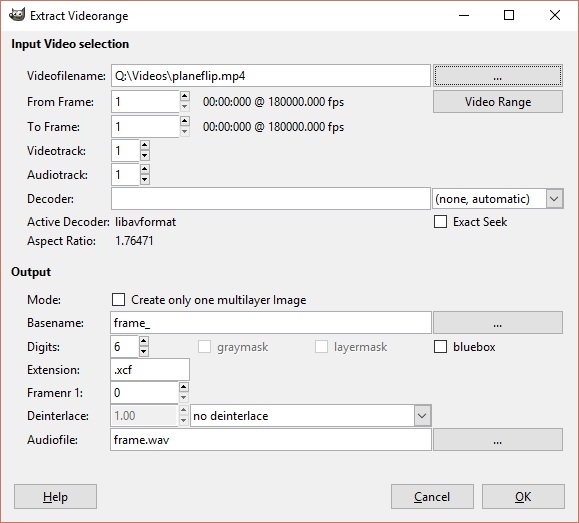
I've tried a random .avi video I have, and that comes up properly at 24~ fps, but I need help getting GIMP to recognize the actual framerate of the video files I want to edit.
I also originally tried the method where you trim/record the section you want using VLC to grab a smaller portion to work with in GIMP. Those files are, apparently, 120000 fps according to GIMP and are also .mp4s.
I tried just working with it anyways, but when I try to slide through the video range preview, the plug-in just freezes so there's no way to accurately locate where I want it to start/stop.
So, I guess what I'm asking is:
Why are these videos showing up as being 180000 fps when they clearly are not?
Is there any way to remedy this?
Thanks and sorry if I don't respond immediately, but your help would be greatly appreciated.
|

|
|
| GIMP 2.8 on OS X 10.6 Snow Leopard |
|
Posted by: mcjardine - 04-05-2018, 08:20 PM - Forum: OSX
- Replies (3)
|
|
Hello everyone,
I had to reinstall OS X on my 2006 MacBook Pro. It is limited to OS X 10.6 snow Leopard as it has a 32-bit processor.
I used to have GIMP 2.8. I can't remember where I found a 32-bit build (maybe unofficial) but now I can't find it anywhere. 2.6 is running fine but I would like 2.8.
I am about to start teaching a graphic design course at the college in which I work, the computers there also have 10.6.8 and I would like to incorporate GIMP. Version 2.8 would be preferable to 2.6.
Can anyone tell me where to find a 32-bit build of 2.8 for OS X 10.6.8 Snow Leopard?
Thanks in advance!
C.
|
|
|
|
| Custom brush nightmare |
|
Posted by: phil123456 - 04-05-2018, 07:05 PM - Forum: General questions
- Replies (7)
|
|
Hello,
I created my own bitmap brushes
but it only draws as black, cant get any color no matter which front/back color I choose
I use grayscale gbr files
also is there a way to change size automaticaly by selecting the brush, otherwise I always have to adjust the size when changing brush, really annoying for pixel art
what am I missing ?
regards
|
|
|
|
| FxCopyrightEgger malfunction |
|
Posted by: GIMPOULOS - 04-03-2018, 10:44 PM - Forum: General questions
- Replies (16)
|
|
On my Gimp 2.8 with Windows 10,when I try to apply Fx Foundry copyright on my images (i used this function successfully with older Gimp) I get 2 error messages : 1) plug in 'Eg coyright placer' image left undo in inconsistent state,closing open undo groups, and b) :
Error when executing script-Fu-egg-copyright .Errror (:1) eval: unbound variable:cadr
Someone please enlighten !
|
|
|
|
| Resolution/ Quality Collage |
|
Posted by: Okatcha - 04-02-2018, 09:48 PM - Forum: General questions
- Replies (3)
|
|
Hi,
I think I need some logic advice please.
I like to create a medley of several images on one page. Iit is primarily designated to use on my 5.2 inch smartphone, 1920x1080, 428ppi.
I also want to zoom in to see the details and text on each individual imag as good as possible. Now I have the problem with selecting the first plank background layer, where I have to specify either the width and height or pixels and the ppi.
Do you have any suggestion what template setting I should choose to have the best quality for my 1920x1080 smartphone?
Thank you very much for your help I appreciate it.
|
|
|
|
| Blending stacked layers |
|
Posted by: jrickards - 04-02-2018, 06:07 PM - Forum: General questions
- Replies (4)
|
|
In this video (https://www.youtube.com/watch?v=E-GbuXU8YMQ), Tony uses image stacking to improve the final image as a result of the combining. Although he uses Photoshop, a similar technique can be used in GIMP.
I have two questions as a result of this video.
(1) In GIMP, to "blend" images, I use G'MIC-Qt. Amongst other options, there are Median and Mean. Mathematically, I know the difference between the two but in terms of the use of those terms in this filter, what are the differences between the two and when might it be better to use one over the other?
(2) When stacking the images in layers in the video referenced above, prior to applying the blending,Tony uses the following procedure (that I will simplify). The opacity of each layer is different and are set to 1/(layer position from the bottom). This means that the bottom layer is 1/1=100%, the second layer from the bottom is 1/2=50%, the third layer from the bottom is 1/3=33%, the fourth layer from the bottom is 1/4=25%, etc. Is this a valid approach? Are there other approaches?
|
|
|
|
| BevelReflectLogo in Python script? |
|
Posted by: racer-x - 04-01-2018, 08:48 AM - Forum: Extending the GIMP
- Replies (18)
|
 |
BevelReflectLogo and 3-D extrusion are in .scm scripts. I was wondering if they could be made into python scripts. It's beyond my ability, but perhaps someone already did (or could do) this?
The reason is for use in the latest Gimp v2.10 RC1 appimage. I can get it to load python scripts by adding two lines at the beginning of the script. I have no idea on how to make it loan .scm scripts however.
To make a python script be able to load in this appimage, add these two lines followed by a space..
|
|
|
|
| Gimp settings folder location |
|
Posted by: js017 - 03-31-2018, 08:08 PM - Forum: General questions
- Replies (3)
|
|
Hi. By default, gimp creates a program settings folder in Windows 7 in the root directory of your user folder, usually "C:\Users\Administrator\.gimp-2.8". How can you change the location of that folder to be in the AppData, Roaming folder, for example, "C:\Users\Computer User\AppData\Roaming\.gimp-2.8"?
I've tried to change the "temporary folder" and "swap folder" locations in edit, preferences, folders, but it keeps creating the .gimp-2.8 folder in the default folder location. Thanks.
|
|
|
|
|



