| Welcome, Guest |
You have to register before you can post on our site.
|
| Forum Statistics |
» Members: 5,196
» Latest member: EdSparks
» Forum threads: 7,845
» Forum posts: 42,602
Full Statistics
|
| Latest Threads |
how to re-color some part...
Forum: General questions
Last Post: saint_m
1 hour ago
» Replies: 16
» Views: 4,799
|
Background - Foreground -...
Forum: General questions
Last Post: rich2005
2 hours ago
» Replies: 1
» Views: 60
|
GIMP 3.2.x not recognizin...
Forum: General questions
Last Post: rich2005
5 hours ago
» Replies: 3
» Views: 124
|
Batcher - Batch Image Pro...
Forum: Extending the GIMP
Last Post: denzjos
10 hours ago
» Replies: 10
» Views: 13,789
|
GIMP Rename Layer (Pro) -...
Forum: Extending the GIMP
Last Post: rich2005
Yesterday, 05:27 PM
» Replies: 3
» Views: 158
|
achieving a overdriven al...
Forum: General questions
Last Post: saint_m
03-27-2026, 05:10 PM
» Replies: 2
» Views: 247
|
GIMP: The Movie | Officia...
Forum: Gallery
Last Post: JakaBasej01
03-27-2026, 01:14 PM
» Replies: 3
» Views: 1,125
|
Severe Security Flaws in ...
Forum: Linux and other Unixen
Last Post: rich2005
03-20-2026, 04:59 PM
» Replies: 6
» Views: 301
|
Parametric Mask plug-in f...
Forum: Extending the GIMP
Last Post: denzjos
03-19-2026, 05:32 PM
» Replies: 1
» Views: 205
|
How do I uninstall GIMP 3...
Forum: Linux and other Unixen
Last Post: rich2005
03-19-2026, 04:29 PM
» Replies: 3
» Views: 2,175
|
|
|
| Gimp 2.9.5 for Windows Users |
|
Posted by: rich2005 - 06-18-2017, 08:32 AM - Forum: Tutorials and tips
- Replies (12)
|
 |
Nateart is new to Gimp, has Gimp 2.8.22 installed and is also trying out a Windows version of Gimp 2.9.5 from http://www.partha.com
This is a nice version, quite stable and since it does not replace Gimp 2.8.x is worth using until Gimp 2.10 comes along.
However Nateart initial view of Gimp is this. A very black theme, a lot of contrast with the canvas.

What can you do about that? All the settings are in the Edit -> Preferences dialogues.
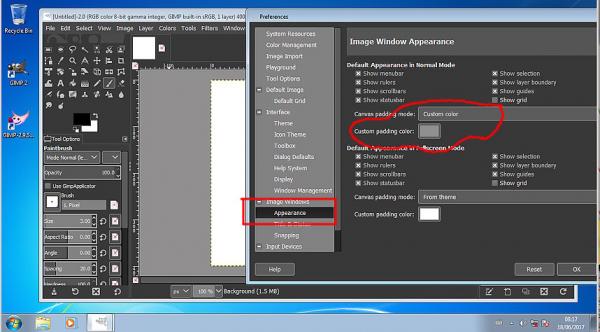
The area around the canvas is called the padding found in Image -> Appearance This can be changed from using the theme setting to a Custom color by clicking in the little color icon and selecting.
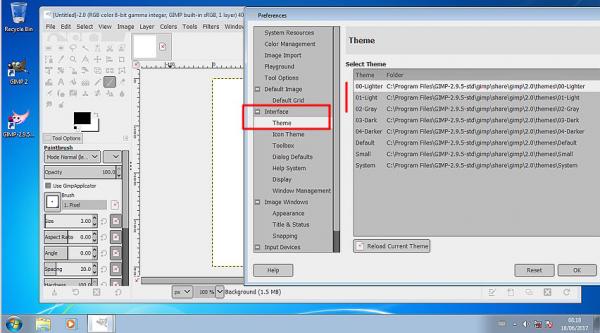
The Black theme too black? That can be changed in Interface -> Theme
Your own bespoke theme can be used but that is best left for another day.
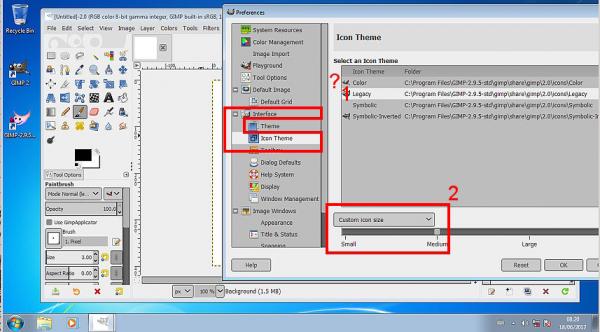
In Gimp 2.9.5 unlike Gimp 2.8 changing the theme does not change the tool icons, making them difficult to see with a light theme.
Use Interface -> Icon Theme In the Partha version the Color theme seems missing but the Legacy is there (1) Icons too small, use Custom icon size, and increase from small to medium. (2)
When all that is finished and you have Gimp set up the way you want, just a reminder you can fix this so Gimp starts up the same every time. In Windows Management untick Save Window positions on exit, click on Save Windows Positions Now Just a personal preference of mine

--------------
Next is just a comment on the Windows default Gimp Profile
Looking in Folders -> (any of the resources, say plug-ins)
The default Gimp profile is C:\Users\your-name\AppData\Roaming\GIMP\2.9 What sort of craziness is that?
![[Image: MLk9F2I.jpg]](http://i.imgur.com/MLk9F2I.jpg)
My advice is make new convenient folders for the resources you use, plug-ins / scripts / brushes ..etc
Add each, in the appropriate section, to the location list.
![[Image: bc0wgdm.jpg]](http://i.imgur.com/bc0wgdm.jpg)
Happy Gimping 
edit: Looking at the Partha installation, There are no MyPaint Brushes installed
So this thread on how to install a new Gimp 2.9.5 resource folder.
https://www.gimp-forum.net/Thread-MyPain...39#pid2339
|

|
|
| Photo resolution vs size |
|
Posted by: sonnystarks - 06-13-2017, 01:14 AM - Forum: General questions
- Replies (1)
|
|
I am confused as to when the best time is to change a photo's resolution from 76 to 300 for printing out a 5 X 7 High Quality print. Do I do it before or after cropping? Do I do it at all and just change the size to 5 X 7 from it's original size of 19 X 25 inches at 76 resolution and let the program do the calculating? I guess I'm confused as to which setting determines the final quality?
|
|
|
|
| Tried others - Gimp works great |
|
Posted by: Nateart - 06-12-2017, 03:37 AM - Forum: Gallery
- Replies (4)
|
 |
Having done illustrations for books, magazines, cards, ads, gift products (like puzzles, wall decor) since 1970... I'm simplifying, Gimp does most of the things I did in the past with Photoshop, Corel Painter, etc. with a lot less hassle...
Should you be curious to look go to Web Site or the FaceBook page
|
|
|
|
|


![[Image: MhiIqt1.jpg]](http://i.imgur.com/MhiIqt1.jpg)
![[Image: lexECqj.jpg]](http://i.imgur.com/lexECqj.jpg)
![[Image: zvPkhNm.jpg]](http://i.imgur.com/zvPkhNm.jpg)
![[Image: QHHQJw4.jpg]](http://i.imgur.com/QHHQJw4.jpg)
![[Image: hYHWp7f.jpg]](http://i.imgur.com/hYHWp7f.jpg)


![[Image: 18952640_10155359175758431_7559993948987...e=59D317EA]](https://scontent.fslc2-1.fna.fbcdn.net/v/t1.0-9/18952640_10155359175758431_7559993948987621796_n.jpg?oh=fa71a783340f9d75c59547e26ac9da29&oe=59D317EA)
