| Welcome, Guest |
You have to register before you can post on our site.
|
| Latest Threads |
Problem with exporting fr...
Forum: General questions
Last Post: rich2005
21 minutes ago
» Replies: 1
» Views: 55
|
strange and crazy, Hamste...
Forum: Watercooler
Last Post: denzjos
9 hours ago
» Replies: 0
» Views: 47
|
How would I be able to be...
Forum: General questions
Last Post: BrokenGamerX
Yesterday, 11:31 PM
» Replies: 6
» Views: 447
|
How to iterate pixels wit...
Forum: Scripting questions
Last Post: Scallact
Yesterday, 12:17 PM
» Replies: 0
» Views: 89
|
What's the Best Way to Ch...
Forum: Other graphics software
Last Post: rich2005
Yesterday, 09:25 AM
» Replies: 1
» Views: 110
|
Triptych - Abandoned Gate...
Forum: Gallery
Last Post: rich2005
Yesterday, 09:04 AM
» Replies: 0
» Views: 84
|
How to restore tool docks...
Forum: General questions
Last Post: sallyanne
Yesterday, 01:48 AM
» Replies: 7
» Views: 1,090
|
Arrow Script
Forum: Extending the GIMP
Last Post: programmer_ceds
06-28-2026, 05:17 PM
» Replies: 135
» Views: 271,995
|
Gimp 3.2.4 tool options d...
Forum: General questions
Last Post: rich2005
06-28-2026, 10:21 AM
» Replies: 1
» Views: 160
|
Linux LMDE changing defau...
Forum: General questions
Last Post: Green Pig
06-27-2026, 01:13 PM
» Replies: 2
» Views: 199
|
|
|
| Gimp not return to multiple windows after using single window mode |
|
Posted by: Pat625 - 09-26-2017, 12:56 AM - Forum: Windows
- Replies (3)
|
 |
I have had Gimp 2.8.22 for some time now without major problems but lately I notice the two tool docks hang up for about 15-30 seconds after closing the large image window. I tried the single window mode and now I cannot get back to the multi window mode. I have the image window, and the two tool docks are together as one. I have not been able to break them apart.
I wonder if this has something to do with the large windows updates that I get every once in awhile. I had one not long before this trouble with Gimp. I use Windows 10.
Has anyone had trouble or know what to do about it?
|

|
|
| Diagonal oval selection |
|
Posted by: Melodicpinpon - 09-25-2017, 11:30 AM - Forum: General questions
- Replies (3)
|
|
Good afternoon, gentlemen,
I'd like to know how I can select with an oval, and rotate -not the part of the image selected- but the selection zone itself, in order to select a diagonal oval.
Thank you in advance for your kind help,
Gauthier
|
|
|
|
| Install gmic gimp plugin Windows 10 demo |
|
Posted by: rich2005 - 09-25-2017, 10:18 AM - Forum: Extending the GIMP
- No Replies
|
|
EDIT: This post was originally for Gimp 2.8.x
For Gimp 2.10.x the gmic_gimp_qt Windows installer works without any modifications.
A 2 minute video here for anyone who has difficulties. https://youtu.be/fTlqYbY-oIA
-------------------------
This is strictly beginner stuff.
The advice for installing compiled plugins, filename.exe is put the plugin along with any associated somefile.dll files directly into the Gimp profile C:\Users\yourname\.gimp-28\plug-ins
There is the occasional plugin that comes with an installer. Some such as BIMP install directly to the main Gimp file structure. Never a good idea when you come to uninstall. Very easy to delete more (or leave behind parts) of the plugin.
Then there is G'mic. http://www.gmic.eu
Very popular, comes with a host of filters, some 470. With the development of the QT interface the installer now creates a new folder to contain, which in the Windows version, is a sizeable number of files.
My advice, until you get a bit more experienced, stick with the defaults.
The default installation folder is: C:\Users\yourname\.gimp-2.8\plug-ins\gmic_gimp_qt
To enable gimp to use the plugin, the path to that location needs adding to the plugins path in:
Edit -> Preferences -> Folders -> Plug-ins
Looks like this:
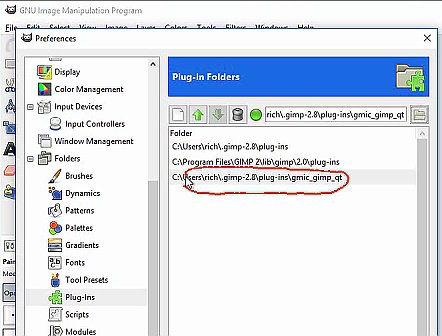
And as ever, for those still confused, a video demo of the above 
|
|
|
|
| .gih brushes |
|
Posted by: Pat625 - 09-24-2017, 07:22 PM - Forum: Extending the GIMP
- Replies (5)
|
|
Is there a script to convert Photoshop tube brushes to .gih so I can use it in GIMP? Every now and then I see one that I would like to use but it is Photoshop. If no script, can it be done manually?
|
|
|
|
| Removing a back ground |
|
Posted by: error718 - 09-22-2017, 08:20 PM - Forum: General questions
- Replies (5)
|
|
hi
I want to make a back ground white (or transparent).
What i have are some warhammer 40k decals from forge world and need to make more of certain types off it.
However once i have scanned it into GIMP it retains the blue back ground with the decals on.
I will need this removing so when i print it on my clear decal paper it comes off 'clear' and not have the blue.
bit hard for me to explain , would be easier if i could post the sheet here but i don't know how too.
kind regards
E
|
|
|
|
| Can't send to printer in high quality mode |
|
Posted by: BobSundquist - 09-22-2017, 12:04 PM - Forum: General questions
- Replies (1)
|
|
I am trying to print from gimp. When I open my printer driver (Brother MFC-J480DW) and select quality = Best then try to print it prints in Normal mode. When I open the printer driver again it shows that it has reverted to Normal mode. I don't have this issue with the printer driver when accessed from other programs.
|
|
|
|
|



![[Image: panorama_geometry1.jpeg]](http://www.temaroma.com/linux_stuff/panorama_geometry1.jpeg)


